
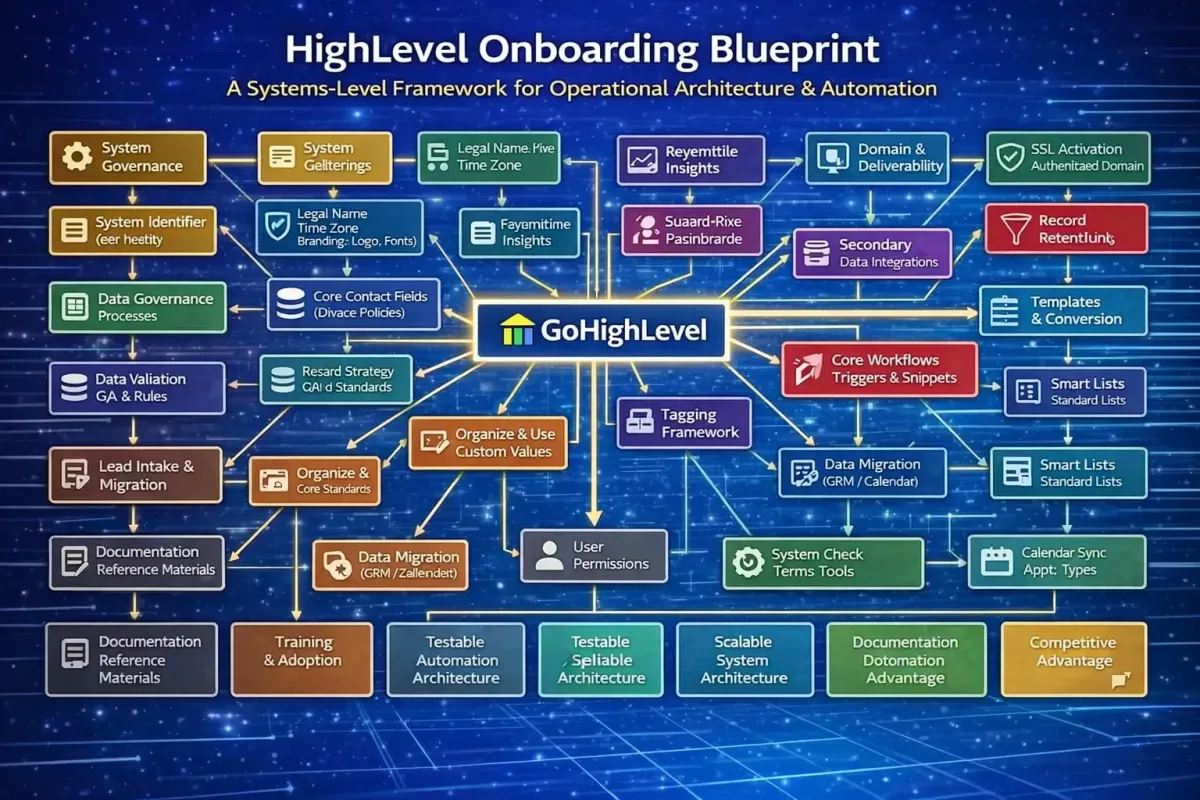
The Complete HighLevel CRM Onboarding Blueprint for Any Business
Implementing a customer relationship management system is not a software task. It is an operational architecture project. The difference between organisations that achieve measurable commercial efficiency from their CRM and those that abandon it within months is not the platform itself, but the onboarding methodology used during setup.
This guide presents a comprehensive, platform-agnostic onboarding framework specifically tailored for businesses deploying HighLevel as their CRM infrastructure. It is intentionally designed to apply across industries, company sizes, and customer types. While every organisation has unique processes, the foundational CRM components that must be configured correctly are nearly identical.
This article focuses exclusively on CRM architecture, data integrity, automation logic, and operational readiness. It deliberately excludes websites, funnels, and social publishing systems in order to concentrate on the elements that determine whether a CRM becomes a dependable business engine or an underused contact database.
Why CRM Onboarding Determines Long-Term Success
CRM onboarding is often treated as a technical setup checklist. In reality, it is a structural design phase that determines how information flows through a company. Every contact created, every deal tracked, every automation triggered, and every report generated depends on decisions made during onboarding.
If these decisions are rushed or improvised, organisations typically experience:
inconsistent data
duplicate records
unreliable reporting
broken automation
poor user adoption
Conversely, when onboarding is engineered correctly, the CRM becomes:
a single source of truth
a real-time operational dashboard
a forecasting engine
a workflow automation system
a customer intelligence platform
The objective of onboarding is therefore not to “get the system running.” It is to construct a structured environment where data is organised, processes are enforced automatically, and teams can rely on the platform for daily operations.

The Universal CRM Onboarding Principle
Regardless of industry, every organisation using a CRM requires the same six foundational layers:
Identity configuration
Data architecture
Classification logic
Communication infrastructure
Pipeline structure
Automation framework
Everything else — integrations, reporting sophistication, advanced segmentation — builds on top of these layers. If they are implemented correctly, expansion becomes straightforward. If they are implemented poorly, scaling becomes increasingly difficult and costly.
Layer 1 — Account Foundations and System Identity
Before importing a single contact, the system must accurately represent the business. This stage ensures that all automated communications, reports, and system outputs reflect correct organisational information.
Core identity configuration includes:
legal business name
trading name
business address
primary phone number
default email identity
time zone
currency
locale
These values populate templates, compliance footers, notifications, and automation logic. Incorrect identity data can propagate across hundreds of automated interactions.
Branding and Consistency
Brand assets such as logos, fonts, and colour schemes should be configured at the account level. Automated emails, documents, and notifications inherit these settings. Consistent branding is not merely aesthetic; it improves trust and recognition across customer touchpoints.
Notification Framework
User notifications should be defined by role. Sales teams may require real-time alerts for new leads, while administrators may only need system warnings. Establishing these defaults early prevents notification overload and improves platform adoption.
Security Configuration
Security must be configured before user expansion. This includes:
creating an owner account
assigning role-based permissions
enforcing two-factor authentication
Proper permission structures prevent accidental configuration changes and protect sensitive customer data.
Layer 2 — System Rules and Data Governance
Before data is introduced, rules must be defined for how the system handles it. This prevents chaos once records begin flowing into the database.
Duplicate Management Strategy
Decide whether duplicate contacts are allowed. The correct answer depends on the business model.
B2B organisations often allow duplicates because multiple contacts may share a phone number.
B2C organisations usually restrict duplicates to maintain clean records.
Define matching criteria such as email or phone number and establish merge policies.
Privacy and Retention Policies
CRM systems store personal data, so organisations must define:
consent tracking rules
communication permissions
data retention timelines
deletion procedures
Clear policies ensure compliance, reduce legal risk, and keep databases manageable.
Layer 3 — CRM Data Architecture
The data structure is the most important element of onboarding. It determines whether information can be filtered, analysed, and automated.
Core Contact Fields
Every CRM requires baseline fields, including:
first name
last name
email
phone
owner
lead source
lifecycle stage
If these are missing or misconfigured, segmentation and reporting become unreliable.
Custom Fields Strategy
Custom fields capture business-specific information such as:
service category
contract value
renewal date
referral source
However, fields should only be created if they serve a defined operational or reporting purpose. Excess fields increase complexity and reduce usability.
Record-Type Segmentation
Fields should be organised according to record type:
Contact fields store identity and segmentation data.
Opportunity fields track deals and forecasting.
Service fields track fulfilment or support activity.
Separating these categories ensures reporting accuracy and prevents automation conflicts.
Naming Standards
Establish a naming convention before creating fields. Consistent naming ensures long-term usability and prevents duplicate or confusing entries.

Layer 4 — Tags, Segmentation, and Lifecycle Logic
If data architecture defines what information is stored, classification logic defines how it is organised and used.
Tagging Framework
Tags categorise contacts for filtering and automation. A structured naming system should include categories such as:
source
status
engagement level
product interest
Consistency is essential. If teams apply tags inconsistently, segmentation becomes unreliable and automations trigger incorrectly.
Lifecycle Stages
Lifecycle stages represent where a contact sits in the customer journey. Typical stages include:
Lead
Qualified Lead
Opportunity
Customer
Retention
Each stage should have documented criteria for entry and exit. This ensures contacts move through stages automatically and reporting reflects real progress rather than subjective interpretation.
A properly defined lifecycle model acts as the logic engine of the CRM.
Layer 5 — Custom Values and Global Variables
Custom values are reusable placeholders that store business information such as company name, address, or support email. Instead of manually entering details in multiple templates, these variables populate automatically wherever referenced.
Benefits include:
consistency across communications
faster template creation
easy updates
reduced maintenance effort
If a business phone number changes, updating it once updates every template instantly.
Layer 6 — Smart Lists and Operational Views
Smart lists are filtered views that allow users to quickly access relevant contact groups. They function as daily work dashboards.
Typical standard lists include:
New Leads
Uncontacted Leads
Active Customers
Open Opportunities
Stale Contacts
Filters should combine lifecycle stage, tags, owner, and activity date. Saving and pinning these lists ensures users can immediately see priority tasks without manual filtering.
Layer 7 — Communication Infrastructure
A CRM becomes operational only when communication channels are connected. Without this, interactions occur outside the system and data becomes fragmented.
Phone Integration
Connecting a dedicated phone number enables calls and messages to be logged automatically. Configure:
caller ID
voicemail
forwarding
recording
Centralised call logging ensures complete interaction history for each contact.
SMS Configuration
Two-way messaging should be enabled so conversations occur directly within the CRM. Where registration is required by carriers, complete this early to avoid restrictions.
Missed-call automation is also recommended. If a call is not answered, the system can send an instant acknowledgement message. This captures opportunities that might otherwise be lost.
Email Infrastructure
Email sending must be configured using an authenticated domain. Authentication protocols confirm message legitimacy and improve deliverability.
Both inbound and outbound email logging should be enabled so communication history is recorded automatically.
Templates and Snippets
Baseline templates should be created for common scenarios:
initial responses
follow-ups
appointment confirmations
Reusable snippets allow staff to reply quickly while maintaining a consistent tone and information.
Layer 8 — Pipelines and Stage Design
Pipelines provide a visual structure for tracking opportunities. They transform abstract sales processes into measurable workflows.
Primary Pipeline
Every organisation requires at least one pipeline representing its core commercial journey. Stage names should match real internal terminology so teams instantly understand status.
Secondary Pipelines
If a business has post-sale processes, a separate fulfilment pipeline should be created. Separating sales and delivery pipelines keeps reporting accurate and avoids operational confusion.
Stage Rules
Define conditions for stage movement and assign tasks to key stages. For example, a new lead stage might require follow-up within a set timeframe.
Stage-based automation ensures consistency and prevents opportunities from being neglected.
Layer 9 — Lead Intake and Data Entry
A CRM must reliably receive data from lead sources. Without defined intake methods, records may be incomplete or misattributed.
Possible intake sources include:
forms
calendar bookings
integrations
manual entry
imports
Every implementation should test lead creation to confirm:
correct field mapping
tag assignment
owner assignment
pipeline creation
Testing ensures data enters cleanly and becomes immediately actionable.
Layer 10 — Data Migration and Import
Importing legacy data requires preparation. Raw exports often contain duplicates, formatting inconsistencies, and outdated information.
Preparation steps include:
removing duplicates
standardising phone formats
aligning statuses with lifecycle stages
validating email structure
Data should be imported in batches rather than all at once. After each batch, spot-check records to confirm accuracy.
Once imports are complete, run duplicate detection tools and merge remaining duplicates. This ensures the database starts in a clean state.
Layer 11 — Automation Framework
Automation is the operational engine of a CRM. Without it, staff must manually manage processes that could run automatically.
Core automation workflows include:
new lead assignment
internal notifications
follow-up task creation
appointment confirmations
stage updates
inactivity reminders
Triggers initiate workflows. Actions execute tasks. Conditions ensure logic runs correctly.
Well-designed automation ensures processes happen consistently without manual intervention.
Layer 12 — Integrations and System Connectivity
Modern businesses rarely operate from a single platform. Integrations connect the CRM with other operational systems so that data flows automatically.
Common integrations include:
calendars for availability syncing
payment platforms for transaction tracking
email providers for conversation logging
meeting tools for event scheduling
After connecting integrations, test data flow to confirm information syncs correctly.
Layer 13 — User Management and Access Control
User configuration determines both security and usability.
Each team member should have:
an account
an assigned role
appropriate permissions
Permissions should restrict access to sensitive information while allowing users to perform their duties efficiently.
User profiles should also include signatures and contact details to maintain professional communication standards.
Layer 14 — Scheduling and Calendars
Calendars allow appointments to be booked automatically and linked directly to contact records.
Configuration includes:
working hours
buffer times
maximum bookings
appointment types
Calendar syncing ensures availability is accurate and prevents double bookings.
Layer 15 — Payments and Billing Infrastructure
If transactions are handled within the system, payment functionality must be configured.
This includes:
payment gateway integration
product or service creation
pricing configuration
proposal templates
invoice templates
Structured payment setup ensures transactions are tracked automatically and financial processes remain consistent.
Layer 16 — Reporting and Performance Visibility
A CRM is only valuable if it produces actionable insights. Reporting configuration ensures performance can be measured accurately.
Key metrics often include:
conversion rate
pipeline value
response time
stage progression
activity levels
Dashboards should be tailored by role so each user sees relevant information. Executives may view revenue forecasts, while sales teams may monitor active opportunities.
Layer 17 — Domain and Deliverability Infrastructure
Before activating campaigns or communication, domain configuration must be validated.
Core requirements:
secure domain connection
SSL activation
authenticated sending domain
branded link domain
Proper configuration protects sender reputation, improves deliverability, and ensures communications appear professional.
Layer 18 — Testing and Validation
Before launch, the entire system must be tested end-to-end.
Testing should include:
automation execution
data import accuracy
communication, sending and receiving
pipeline transitions
user permissions
A full simulation using test records confirms the system functions as a cohesive environment rather than a collection of isolated features.
Layer 19 — Documentation and Handoff
Documentation ensures the system can be maintained long-term. It should include:
field definitions
tag structure
pipeline logic
automation diagrams
Screen recordings demonstrating daily tasks help users understand how to operate the system efficiently.
Governance should also be defined, specifying who is authorised to modify fields, tags, or workflows.
Layer 20 — Training and Adoption
Even a perfectly configured CRM fails if users do not understand how to use it. Training should cover:
navigation
daily workflows
record updates
pipeline management
communication handling
Providing reference materials enables staff to resolve questions independently and improves long-term adoption.

Scope Boundaries: What Standard CRM Onboarding Does Not Include
Certain tasks fall outside standard CRM configuration and typically require separate projects. These include:
website development
advertising management
custom software development
complex API integrations
industry-specific compliance engineering
ongoing operational services
Defining scope boundaries prevents misaligned expectations and ensures onboarding remains focused on building a reliable CRM foundation.
The Strategic Outcome of Proper CRM Onboarding
When implemented correctly, a CRM becomes more than a system. It becomes infrastructure.
A properly onboarded platform delivers:
clean data
reliable automation
accurate reporting
secure access
scalable architecture
Most importantly, it creates operational consistency. Every lead is handled the same way. Every opportunity follows a defined path. Every interaction is recorded. Every metric is measurable.
This consistency is what transforms a CRM from software into a competitive advantage.
Final Perspective
CRM onboarding is not a technical step. It is a strategic investment in operational discipline. Businesses that approach it methodically gain visibility, efficiency, and scalability. Those who rush it inherit technical debt that compounds over time.
The universal framework above applies across industries because it focuses on structural principles rather than niche workflows. Once these principles are implemented, the system can be adapted to any business model without compromising stability.
In practical terms, onboarding determines whether a CRM becomes:
a passive database, or
an active operational engine
The organisations that recognise this distinction are the ones that unlock the full value of their platform.