
HIghLevel: Tags Architecture Versus Relational Database Architecture
Forget Tags. Design HighLevel Like a Relationship Database
For years, HighLevel users have built systems around tags. Every workflow added another tag. Every automation checked whether a tag existed. Every report depended on dozens or even hundreds of tags that represented temporary states rather than structured business information. That approach worked when HighLevel was primarily a marketing automation platform. It is no longer the best way to design a CRM. The platform has matured. The data demands of modern businesses have outgrown the label-everything mentality. And the agencies that continue building this way are creating systems that will inevitably collapse under their own weight.
HighLevel Is No Longer Just a Marketing Automation Platform
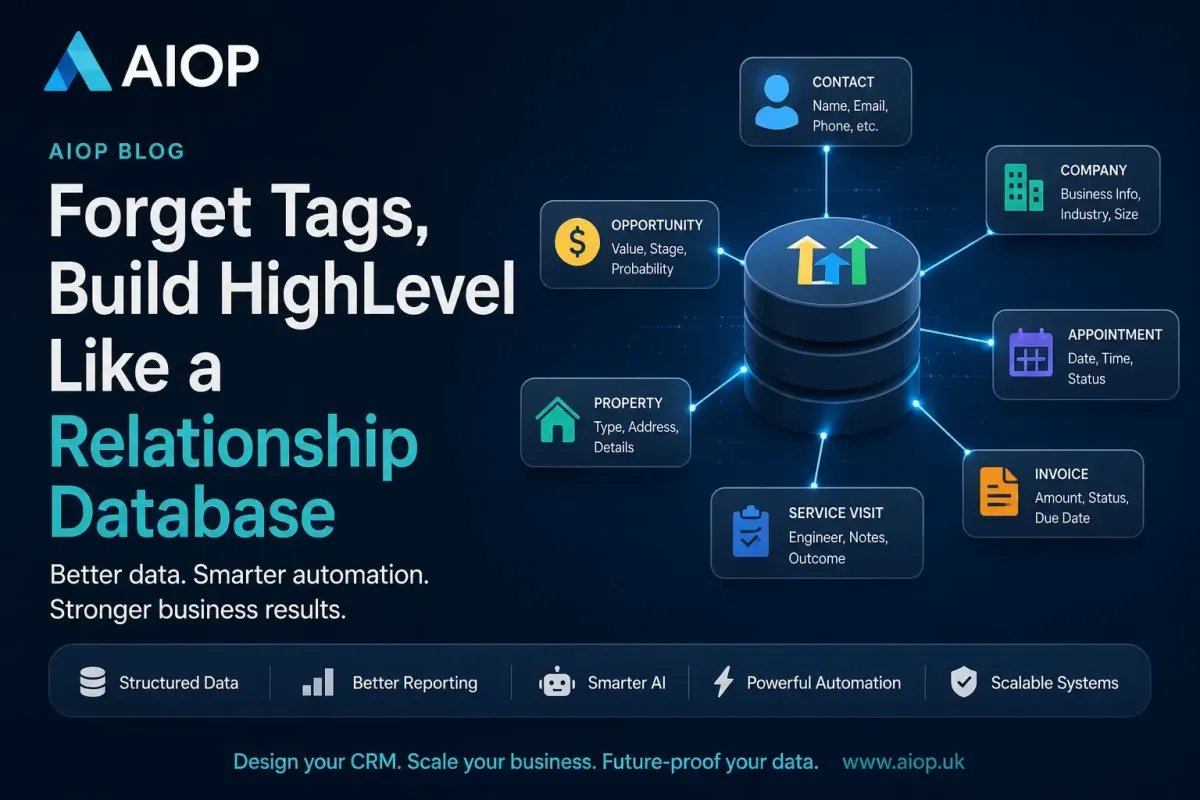
Today's HighLevel has evolved into something substantially larger. With custom fields, opportunity fields, Companies, Custom Objects, associations and increasingly sophisticated reporting, it has become a genuine relationship database capable of modelling how businesses actually operate. HighLevel now supports custom objects with their own fields, associations and workflow automation, allowing businesses to represent real-world entities rather than forcing everything into contact records. The businesses that build scalable CRM systems are no longer asking "Which tag should I add?" Instead, they ask, "What piece of information am I trying to model?" That single change in thinking produces cleaner automation, better reporting, more reliable AI and CRM systems that remain maintainable years later. This is not a minor adjustment. It is a fundamental shift in how you approach the platform.
The Platform Maturity Curve
Every software platform follows a predictable trajectory. It starts simple, solves one problem well, and attracts users who need exactly that solution. HighLevel began as a marketing automation tool, and its earliest features reflected that: emails, SMS, simple funnels and tags to track where contacts sat within those funnels. But as the platform has grown, it has absorbed capabilities that were previously the domain of proper CRM systems and even lightweight ERPs. Opportunity pipelines with custom fields arrived. Companies were introduced. Custom Objects emerged. Reporting became more sophisticated. The metadata layer beneath the platform changed, even if most users did not notice. The question is whether your approach to building within HighLevel has evolved at the same pace as the platform itself. For most users, the honest answer is no.

The Problem With Most HighLevel Setups
Many users still design HighLevel as though it were simply an email automation tool. Their CRM contains hundreds of tags, many outdated, duplicated or conflicting. It contains duplicated information, the same data stored across multiple fields and notes. It contains notes holding important data that should be structured. It contains workflow logic spread across dozens of automations, making changes risky and time-consuming. It contains reports that cannot answer simple business questions, because the underlying data lacks structure. This is not a hypothetical pattern. It is the default state of most HighLevel instances we encounter at AIOP.
The Hidden Cost of Tag Architecture
The problems with tag-heavy architectures are not immediately visible. When you have fifty tags, everything still functions. Workflows trigger. Reports run, even if the numbers look slightly off. Automations fire, even if occasionally the wrong contact slips through. The real cost emerges gradually. It emerges when a team member cannot remember whether the active tag is "Quote Sent" or "Quote Sent 2024" or "Quote Sent — New Process." It emerges when a report shows seventeen contacts tagged as both "Quote Accepted" and "Quote Rejected." It emerges when an automation fails silently because a conflicting tag caused a workflow to skip a step. It emerges when you try to build an AI agent and realise there is no structured data for it to read. The cost is not a single catastrophic failure. It is a slow, compounding erosion of trust in your own CRM.
Think Like a Database Designer
Software engineers rarely ask where to place another flag. Instead, they identify entities. For a cleaning company, those entities might be Contact, Opportunity, Property, Quote, Appointment, Invoice and Service Visit. Each entity has its own information. Relationships connect those entities together. That is exactly how HighLevel is increasingly designed to work through contacts, opportunities, companies and custom objects with associations between records. The shift from tag thinking to entity thinking is not about learning technical database theory. It is about learning to see your business as a collection of distinct things that relate to each other in predictable ways.
Entities, Attributes and Relationships
These three concepts form the foundation of every relational database, and understanding them transforms how you approach HighLevel. An entity is a distinct thing your business needs to track: a contact, a property, an invoice. An attribute is a piece of information that belongs to that entity: a name, an address, an amount. A relationship is the connection between entities: a contact owns a property, an invoice belongs to an appointment. When you start identifying these three things before touching a single workflow, your entire system becomes more coherent. You stop asking "Where do I put this tag?" and start asking "Which entity does this information belong to, and what type of data is it?" That question alone eliminates most architectural mistakes.
A Practical Example
Consider a dental practice. A tag-based approach might label a patient with "Treatment Plan Sent," "Treatment Accepted," "Implant Candidate," "Hygiene Scheduled," "Outstanding Balance", and "High Value Patient."
Each of these represents genuinely important business information. But none of them is categories. They are attributes of different entities. Treatment plan status belongs on the opportunity or a custom object. Treatment type belongs to the opportunity. Hygiene appointment status belongs on the appointment. Outstanding balance belongs on an invoice or a financial custom object. Patient value belongs on the contact. When you unpack the tags into their proper entities and attributes, the system becomes transparent. Every piece of information has one home. Every report queries one source of truth.
The Problem With Tags
Tags answer one question exceptionally well: has something happened? Examples include "Downloaded Guide," "Google Ads Lead," "VIP Customer", and "Webinar Attendee." These describe events or classifications. They work well because they represent a moment in time or a broad category.
Problems begin when tags are used to store business data. Examples include "Quote Sent," "Quote Accepted," "Waiting For Payment," "First Visit Complete," "Monthly Customer," "Appointment Tomorrow" and "Engineer Assigned." These are not categories. They are structured pieces of business information masquerading as labels.

Why Tags Fail for Business Data
When dozens of tags represent a business state, several issues appear systematically. Reporting becomes impossible because you cannot easily sum quote values by status when status lives across twelve different tags. Conflicting tags emerge because a contact can simultaneously carry "Quote Sent" and "Quote Accepted" with no mechanism to enforce mutual exclusivity. Automation conflicts arise because multiple workflows trigger based on overlapping tag logic, creating race conditions that are nearly impossible to debug. Duplicate information proliferates because the same fact gets stored in three different places. AI decisions suffer because agents receive noise instead of structure. Maintenance becomes a nightmare because nobody remembers which of the 200 tags are still active.
The Mutual Exclusivity Problem
This deserves particular attention because it is the subtlest and most damaging issue. A dropdown field with options "Sent," "Accepted", and "Rejected" enforces a single current state. A contact cannot be both accepted and rejected simultaneously. Tags offer no such enforcement. A contact can carry "Quote Sent," "Quote Accepted," "Quote Rejected", and "Quote Expired" all at once.
Which one is true? Your automation has to guess, typically by checking which tag was added most recently, which adds complexity and fragility to every workflow that touches that data. This single problem is responsible for more broken HighLevel automations than any other architectural choice.
Fields Represent Facts
Custom fields represent facts. A quote status belongs in a dropdown. A quote value belongs in a currency field. A last appointment date belongs in a date field. The next appointment date belongs in a date field. A lead source belongs in a dropdown. A monthly spend belongs in a currency field. A membership level belongs in a dropdown. An assigned engineer belongs in a user field. A service frequency belongs in a dropdown. A field has one authoritative value. A tag can have many contradictory values. One represents structured data. The other represents history. When you store data in a field, you can report on it, filter by it, and use it in automation logic with confidence. When you store it in a tag, you are creating ambiguity that will eventually break your reporting.
Choosing the Right Field Type
Part of thinking like a database designer means choosing field types deliberately, not just picking whatever seems convenient. Dropdown fields should be used when the value must come from a fixed list. This prevents data entry variation that destroys reporting. If one user types "Google" and another types "Google Ads" and a third types "Google Ads," your lead source report becomes meaningless. A dropdown with a single option called "Google Ads" eliminates this. Date fields should be used for anything temporal, not text fields with manually typed dates. Currency fields should be used for monetary values, not numeric fields or text fields. Each field type carries its own validation, its own formatting and its own reporting capabilities. Choosing the wrong type undermines all three.
Calculated Fields and Formulas
HighLevel has increasingly supported calculated fields and formula-like logic within custom fields and math workflow actions. This is where database thinking really pays off. Instead of creating a tag called "High Value Customer" and manually applying it, you can create a calculated field that evaluates total spend against a threshold. Instead of a tag called "Overdue," you can calculate the difference between a due date and today's date. The data maintains itself. The tag approach requires a workflow to add it, another workflow to remove it, and inevitably breaks when one of those workflows fails silently. Calculated fields derived from structured data are inherently more reliable than tags applied by automation.
Pipelines Are Not Business Status
This is probably one of the biggest architectural mistakes we see. Many people attempt to make pipeline stages represent everything. A single pipeline tries to track lead qualification, quote status, booking progress and payment state all at once. Instead, a pipeline should represent where an opportunity currently sits within one business process. For example, a sales pipeline might progress from New Lead to Quote Calculated to Quote Sent to Address Received to Booking Made to First Service Completed. But other business processes deserve their own fields.
Separating Business Processes
Consider a quote status field with options: Required, Calculated, Sent, Accepted and Rejected. Consider an appointment status field with options: None, Scheduled, Confirmed, Completed and Cancelled. Consider a payment status field with options: Awaiting, Paid and Refunded. Each represents a different business process. Keeping them separate produces cleaner reporting and automation dramatically. You can report on quote acceptance rates independently from appointment completion rates. You can trigger workflows based on payment status without touching your sales pipeline. You can see at a glance where the bottleneck sits in each process, rather than staring at a single pipeline that mashes everything together.
The One Process Per Pipeline Rule
A useful heuristic is this: if moving a deal to the next stage requires something unrelated to the sales process to happen first, your pipeline is doing too much. If a deal stalls because you are waiting for a payment that has nothing to do with whether the prospect has been sold to, you have conflated two processes. Sales pipelines should track sales. Appointment pipelines should track appointments. If HighLevel does not natively support multiple pipeline types on a single contact in the way you need, use custom fields to track the secondary processes and reserve the pipeline for the primary one.
AI Needs Structured Data
One of the biggest misconceptions surrounding AI is that prompts are everything. They are not. AI is only as intelligent as the information it receives. Compare two approaches. The poor architecture feeds the AI a list of tags: Quote Sent, Booked, Interested, SMS Sent, and Hot Lead. The good architecture feeds it structured facts: Quote Status equals Sent, Quote Value equals £185, Service Type equals Carpet Cleaning, Property Type equals Detached, Lead Source equals Google Ads, Last Contact Date equals 14 July, Booking Status equals Awaiting Confirmation. The second version gives an AI agent a genuine business context. Instead of trying to infer meaning from a scattered collection of tags, it understands structured facts. It knows the quote value. It knows the property type. It knows where the booking process sits. That enables significantly better decision-making.

Why AI Agents Fail on Tag Architectures
AI agents operate by reasoning over structured information. When they encounter a tag like "Hot Lead," they have no idea what makes the lead hot. Is it their budget? Their industry? Their engagement level? The tag is a conclusion without evidence. When they encounter a currency field showing £12,000 in annual spend and a dropdown showing "Enterprise" as the account tier, they have actual evidence to reason from. The difference becomes stark when you ask AI to prioritise leads, draft follow-up messages or recommend next actions. On a tag architecture, the AI guesses. On a structured architecture, the AI reasons. When you eventually integrate AI agents into your HighLevel workflow, the quality of your data architecture will determine whether they deliver value or create chaos.
Preparing for Conversational CRM
The direction HighLevel is moving, and the direction the entire CRM industry is moving, is towards conversational interfaces. Users will increasingly interact with their CRM through natural language: "Show me all accepted quotes over £500 that have not been booked yet." That query is trivial to answer if your data lives in fields. It is nearly impossible to answer if your data lives in tags, because the system would need to understand that the tag "Quote Accepted" is semantically equivalent to a quote status of accepted, and that no tag meaning "not booked" exists in a reliable form. Structured data is not just about today's reports and workflows. It is about making your CRM ready for the way people will interact with software tomorrow.
Reports Become Much Simpler
Imagine needing to answer these questions: which lead source produces the highest quote values, which engineer closes the most bookings, which property type has the highest conversion rate, what is the average days from enquiry to booking, and what is the average quote value by postcode. These reports become straightforward when data lives in fields instead of tags. The database has a structure. Reporting tools can query the structure. They cannot reliably analyse hundreds of inconsistent tags. When your data is properly structured, reports that previously felt impossible become simple filter and grouping exercises. Your leadership team gets answers quickly, and your CRM becomes a strategic asset rather than a source of frustration.
The Reporting Feedback Loop
There is a useful feedback loop that emerges when you start thinking architecturally. You design a field. You build a report against it. The report reveals a gap in your data model. You add another field or another entity. The reports get better. The business asks new questions. You extend the model again. This cycle is how mature CRM systems evolve. It cannot happen with tags because there is no reliable structure to build reports against. You are always working around the limitations of your data rather than building on its strengths. Once you experience reporting on a well-structured HighLevel instance, the idea of going back to tag-based reports feels absurd.
What Becomes Possible
With structured data, you can build conversion funnels by lead source. You can calculate customer lifetime value segmented by acquisition channel. You can identify which services have the highest margin when you combine quote values with custom object data on actual costs. You can measure time-to-close by the salesperson. You can predict churn by analysing the gap between expected and actual service frequency. None of this requires advanced technical skills. It requires the data to exist in the right format. That is an architecture problem, not a reporting problem.
Custom Objects Change Everything
Perhaps the biggest architectural shift is the arrival of Custom Objects. Instead of forcing every piece of information onto a contact record, HighLevel now allows entirely new record types with their own fields, relationships and automation. This enables many-to-many associations and cleaner modelling of assets such as properties, vehicles, projects or subscriptions. Consider a cleaning company. They might have one customer, three properties, twelve appointments and forty invoices. Trying to represent that with contact fields quickly becomes impossible. Do you create Property 1 Address, Property 2 Address, Property 3 Address? What happens when a customer has four properties? What about the relationship between a specific invoice and a specific property? Relationship databases solve this naturally. One Contact links to three Property records. Each Property links to its own Appointments. Each Appointment links to its own Invoice. HighLevel is steadily moving in that direction with Custom Objects.
When to Introduce a Custom Object
Not every piece of information warrants its own object. A useful test is whether the thing you are modelling has a lifecycle independent of the contact. A lead source does not need its own object because it is simply an attribute of the opportunity. But a property does, because a property exists regardless of who owns it, can be associated with multiple contacts over time, and has its own attributes like address, type and size that do not belong on a person. A vehicle does, because a vehicle has its own registration, make, model and service history. A subscription does, because it has its own start date, end date, billing amount and status. If the thing you are tracking could reasonably exist without the contact, it probably deserves its own object.
Associations and Many-to-Many Relationships
The true power of Custom Objects emerges through associations. In a traditional contact-centric CRM, the relationship between a contact and a property is one-to-many at best: one contact, many properties stored as sub-records or duplicated fields. With Custom Objects and associations, you can model many-to-many relationships accurately. A property can be associated with an owner and a tenant. A project can involve multiple contacts from the same company. A course can have multiple attendees, each with their own completion status. This is how real businesses actually operate, and it is how HighLevel is now designed to model them. When you start thinking in entities and relationships rather than contacts and tags, entirely new possibilities emerge. You can build systems that accurately reflect how your business actually operates, not how your CRM vendor decided to structure data a decade ago.
Companies and the Missing Middle Layer
One of the most underused features in HighLevel is the Company record. Most users skip it entirely and treat every contact as an independent entity. This works for B2C businesses but creates significant problems for B2B. When a company has five contacts, each with their own opportunity, you have no way to see the total relationship value. When the primary contact leaves, you lose the organisational context. When you need to report on company-level metrics like total contract value or number of active engagements, the data is scattered across individual contact records. The Company object exists to solve exactly this problem. It sits between the contact and the opportunity, providing an organisational layer that most B2B businesses desperately need.
How Companies Fit the Relationship Model
Think of the Company as a parent entity. Contacts belong to it. Opportunities can be linked to either the contact or the company, depending on your sales process. Custom objects, like projects or subscriptions, can be associated with the company. This creates a clean hierarchy: Company contains Contacts, Company has Opportunities, Company has Projects, and Company has Subscriptions. Reporting becomes dramatically more powerful because you can aggregate at the company level. You can see the total revenue per company. You can identify companies with multiple opportunities in different stages. You can spot accounts that are expanding versus those that are shrinking. None of this is possible when every contact floats independently.
When Should You Still Use Tags?
Tags are far from obsolete. They remain excellent for campaign membership, temporary automation markers, behavioural labels, historical events and segmentation. Examples include "Downloaded eBook," "Facebook Lead," "VIP," "Webinar Attendee" and "Imported Contact." Think of tags as sticky notes. Think of fields as database columns. They solve different problems. The mistake is not using tags. The mistake is using tags when you need a column. A good rule of thumb: if you would ever need to count, sum, average or group by a piece of information, it belongs in a field, not a tag.
Tags as Automation Markers
One legitimate use of tags that often gets confused with data storage is the automation marker pattern. Sometimes you need a temporary flag to coordinate between workflows. A tag like "Processing Refund" or "Awaiting Manual Review" that exists only for the duration of a workflow and gets removed when the process completes is a valid use. The key distinction is temporality. If the tag is meant to be permanent, it is probably storing data. If it is meant to be transient, existing only while a process runs, it is functioning as a workflow coordination mechanism. The danger is when transient markers become permanent because the removal step fails or was never built. Auditing your tags periodically for permanence versus transience is a healthy architectural practice.
Migrating From Tags to Structure
If you are reading this and recognising your own HighLevel instance, the question becomes: how do you move from a tag-based system to a structured one? The answer is not to delete everything and start over. It is to systematically replace tags with fields while maintaining operational continuity.
Start by auditing your existing tags. Categorise each one as an event, a behavioural label or disguised business data. The disguised business data tags are your migration targets. For each one, create the appropriate custom field, decide on the right data type, and build a one-time workflow that reads the tag and writes the equivalent value into the field.
Then update your existing automations to reference the field instead of the tag. Once everything is verified, remove the tag. This is methodical, unglamorous work, but it pays compound returns for as long as you use the system.
The Audit Framework
Create a spreadsheet with four columns: Tag Name, Category, Proposed Replacement, and Priority. Category should be one of three values: Keep as Tag, Migrate to Field, or Delete Entirely. You will be surprised how many tags fall into the Delete category, tags that were created for a campaign two years ago and applied to forty contacts who have long since moved through the process.
For the Migrate to Field entries, specify the entity the field belongs to, the field type and the allowed values. Priority should be based on how frequently the tag is referenced in automations and reports. Start with the highest priority migrations first, because they deliver the most immediate improvement to system reliability.
Design for the Future, Not Today's Workflow
The biggest difference between beginners and experienced CRM architects is this: beginners design workflows, experts design databases. Once the database is correct, workflows become simpler, reports become accurate, AI becomes more intelligent, integrations become easier, and maintenance becomes dramatically lower. The architecture lasts for years. The workflows simply become layers that interact with it.
When a new business requirement appears, you do not need to redesign everything. You add a field, create an association, perhaps introduce a Custom Object. The foundation holds. This is the difference between a CRM that gets more fragile over time and one that gets more powerful.
The Layered Architecture Principle
Think of your HighLevel system in three layers. The bottom layer is data: contacts, companies, opportunities, custom objects and the fields that define them. The middle layer is logic: workflows, pipelines and automations that operate on that data. The top layer is the interface: dashboards, reports and AI interactions that present the data to humans and agents.
Most users build top-down. They start with a workflow they need, add whatever tags and fields are required to make it work, and then wonder why their reports do not make sense. Database architects build bottom-up. They define the data model first, ensuring every entity has the right attributes and every relationship is properly structured. Then they build logic on top of that solid foundation. Then they create interfaces to expose the results. When you build this way, changes at any layer do not cascade destructively through the others.
Conclusion
HighLevel has evolved far beyond the marketing automation platform it once was. Modern CRM design is no longer about collecting tags or building increasingly complex automation trees. It is about modelling a business as accurately as possible through structured data, meaningful relationships and well-designed entities.
Every time you create a new workflow, ask yourself one question first: Am I storing an event, or am I storing business data? If it is business data, it probably belongs in a field, an object or a relationship, not another tag.
That simple principle will help you build CRM systems that scale, produce reliable reporting, support AI-driven automation and remain easy to maintain as your business grows. At AIOP, we help businesses design HighLevel systems built on solid data architecture, not tag soup. If you are ready to think beyond workflows and start building a CRM that actually scales, get in touch.