
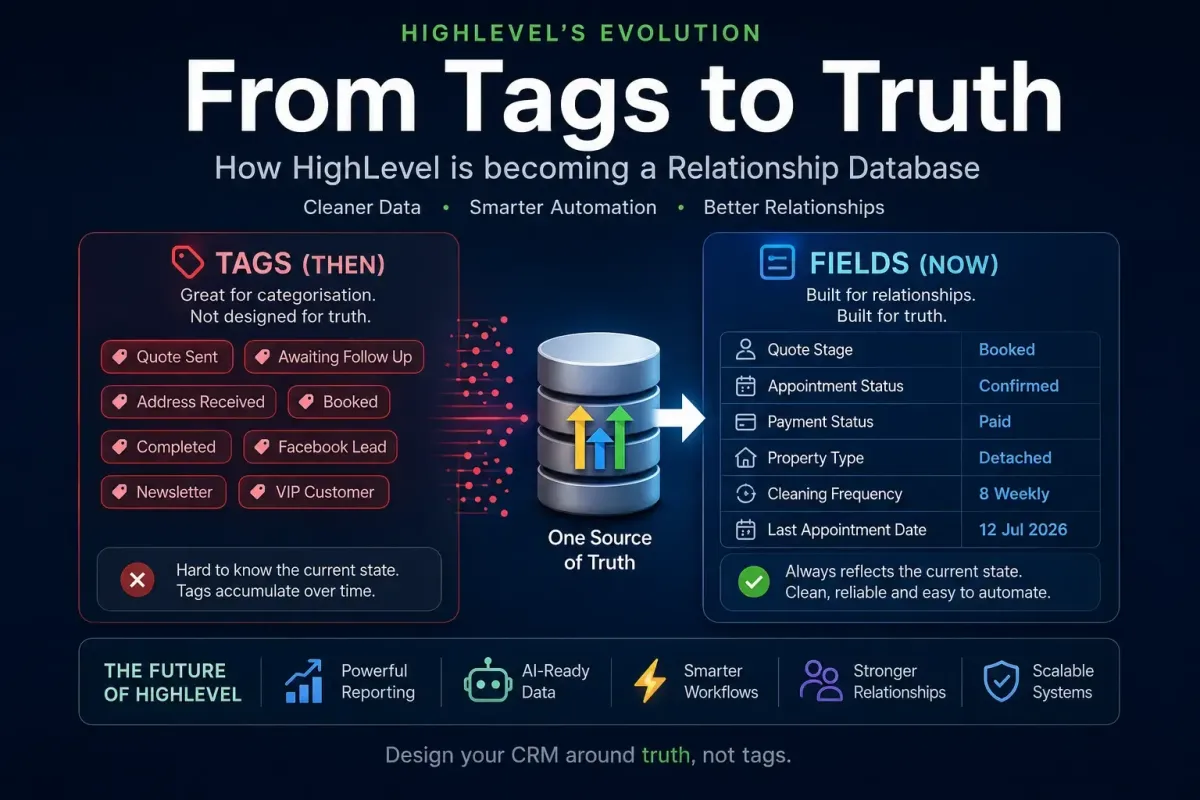
Why HighLevel Custom Fields Are Replacing Tags for CRM Architecture
Over the past few years, HighLevel has undergone a significant transformation. What began primarily as a marketing automation platform has steadily evolved into a comprehensive customer relationship management (CRM) system.
That evolution changes how we should design our databases.
Many experienced HighLevel users still build systems around tags because that was historically the recommended approach. However, as HighLevel has introduced more advanced CRM capabilities—including opportunities, custom reports, relationship tracking, custom objects, AI, workflows, dashboards and increasingly sophisticated custom fields—the architectural role of tags has become much smaller.
In many modern HighLevel implementations, fields should now be considered the primary source of truth, while tags have become secondary tools used for categorisation and automation.
The Difference Between a Marketing Database and a Relationship Database
Traditional email marketing platforms such as Mailchimp, ActiveCampaign and early marketing automation systems primarily focused on audiences.
Contacts were organised using:
Tags
Lists
Segments
Campaign membership
The objective was simple:
Who should receive this message?
A CRM has a very different objective.
Instead of asking who should receive an email, it asks:
Where is this customer in their journey?
What is their current relationship with the business?
What happened previously?
What should happen next?
This requires structured data rather than collections of labels.

Understanding Database Architecture
Every CRM needs a single source of truth.
For example, consider a quotation process.
A customer may move through these stages:
New Lead
Quote Calculated
Quote Sent
Awaiting Follow-up
Address Received
Booked
Completed
At any given moment, the customer occupies only one of these states.
This makes the information ideal for a custom field.
Quote Stage = Quote Sent
Later...
Quote Stage = Booked
The previous state disappears because it is no longer true.
The database always reflects reality.
Why Tags Become Increasingly Difficult to Manage
Many older HighLevel systems represent every stage using a separate tag.
For example:
Quote Sent
Awaiting Follow-up
Booked
Completed
Initially this appears simple.
However, over time the database begins accumulating historical labels.
A contact may eventually contain:
Quote Sent
Awaiting Follow-up
Booked
Completed
Which one represents the customer's current status?
The answer depends entirely on whether every workflow remembered to remove every previous tag.
As systems become larger, this becomes increasingly difficult to maintain.
Eventually the tags stop representing reality and instead become a historical record of everything that has ever happened.
Fields Represent Current Truth
Fields are fundamentally different.
A field contains one value.
That value represents the current state.
Examples include:
Quote Stage
Appointment Status
Payment Status
Customer Type
Property Type
Cleaning Frequency
Last Appointment Date
Account Manager
Each field answers a simple question:
What is true right now?
This makes reporting, filtering and automation dramatically simpler.
Tags Represent History and Classification
Tags still have an important role.
They simply serve a different purpose.
Rather than representing current status, they are better suited for recording historical events or classifications.
Examples include:
Facebook Lead
Google Ads
VIP Customer
Newsletter Subscriber
Commercial Property
Existing Customer
Requested Callback
Unlike stages, these characteristics can all exist simultaneously.
A customer can legitimately be:
Facebook Lead
Newsletter Subscriber
VIP Customer
There is no conflict because none of these attempt to describe the customer's current position in a workflow.
HighLevel's Direction Supports Field-Based Architecture
Recent improvements throughout HighLevel strongly suggest that the platform itself is moving towards a more traditional CRM architecture.
Examples include:
More powerful custom fields
Better opportunity management
Enhanced workflow triggers based on field changes
Improved reporting
AI actions that read and write structured data
Relationship-based automations
More advanced pipelines
Better dashboard capabilities
These features all rely on structured information.
AI, reporting and automation perform far better when reading a single field than attempting to interpret multiple tags.
Fields Improve Automation Design
Consider a quotation workflow.
Instead of adding and removing tags throughout dozens of workflows:
Add Tag
Quote Sent
A more robust design is:
Update Field Quote Stage = Quote Sent
Every downstream workflow simply watches for one event:
Quote Stage changes
This creates a single, authoritative workflow architecture.
Instead of dozens of tags driving the system, one field becomes the central controller.
Reporting Becomes Much More Reliable
Imagine asking:
How many quotations are currently awaiting follow-up?
With fields:
Quote Stage = Awaiting Follow-up
The answer is immediate.
With tags, you may discover contacts containing:
Quote Sent
Follow-up
Booked
Completed
without older tags ever being removed.
The report becomes unreliable.
Structured fields eliminate this ambiguity.
AI Benefits from Structured Data
Artificial Intelligence performs best when information is structured.
An AI assistant can easily understand:
Quote Stage = Address Received
or
Appointment Status = Confirmed
It is much harder for AI to infer meaning from a collection of historical tags.
As HighLevel continues investing heavily in AI, structured fields will become increasingly valuable.
A Modern HighLevel Architecture
For most businesses, an effective design follows a simple principle.
Use Fields For
Pipeline stages
Sales stages
Appointment status
Payment status
Customer type
Last activity
Dates
Numbers
Structured business information
Use Tags For
Lead source
Marketing segmentation
Interests
Historical milestones
Campaign membership
Temporary workflow flags
Automation markers
The Future of HighLevel
Tags are not disappearing.
They remain an excellent solution for segmentation, marketing and behavioural classification.
However, they are no longer the backbone of a well-designed HighLevel CRM.
As HighLevel continues evolving into a fully featured relationship database, fields increasingly become the system's single source of truth.
From a systems architecture perspective, this leads to cleaner workflows, more reliable reporting, better AI integrations and databases that are considerably easier to maintain.
The most scalable HighLevel implementations are no longer built around collections of tags.
They are built around structured data.