
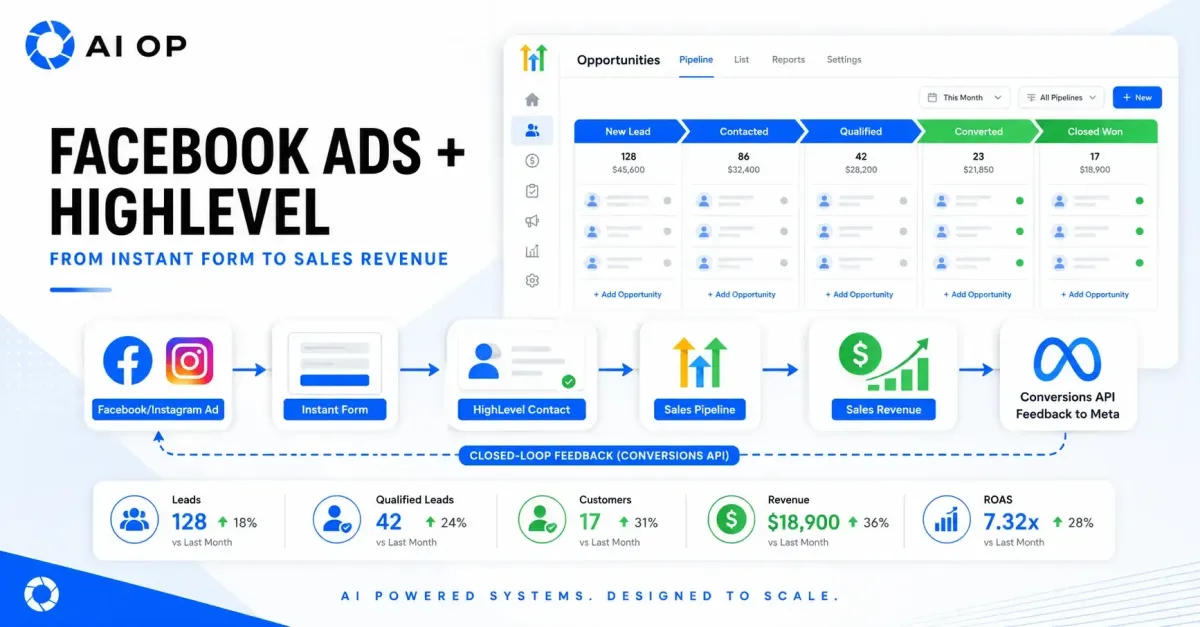
How to use HighLevel with Facebook & Instagram Ads
From Lead Capture to Revenue Loop
Facebook and Instagram Ads are extremely good at one thing: generating volume. A well-targeted campaign can produce dozens of leads a day at a low cost per lead. But volume is not the same as value, and cost per lead is one of the most misleading metrics in digital marketing when viewed on its own.
A campaign generating 80 leads at £20 each is not automatically better than one generating 45 leads at £30 each. The critical question is never "how cheap was the lead?" — it's "which campaign produced profitable customers?"
This guide provides a comprehensive framework for connecting Meta advertising with HighLevel CRM to build a closed-loop revenue system: capturing leads instantly, automating qualification and nurturing, tracking opportunities through a structured sales pipeline, and feeding commercial outcomes back to Meta through the Conversions API — so the algorithm optimises for customer value, not just form completions.
Why Cost Per Lead Is the Wrong North Star
Meta Ads Manager makes it easy to compare campaigns on surface metrics. Imagine Campaign A produces 80 leads at £20 each (£1,600 spend), while Campaign B produces 45 leads at £30 each (£1,350 spend). On paper, Campaign A wins — almost double the leads for two-thirds the cost per lead.
But that comparison ignores everything that happens after submission: how many leads answered the phone, how many met qualification criteria, how many booked appointments, how many became paying customers, and what total revenue was generated. Without CRM data, you're optimising for form fillers, not customers.
HighLevel turns Meta advertising from a lead-generation expense into a revenue-generating system by capturing leads instantly, triggering sub-second follow-up, moving leads through a defined pipeline, automating long-term nurturing, sending revenue signals back to Meta, and using CRM segments to build smarter audiences. The objective isn't more leads — it's more of the leads that become profitable customers, and giving Meta's algorithm the data it needs to find them.
Facebook Ads Differs from Google Ads
Google Search Ads respond to existing demand. Someone types "emergency plumber near me" because they already need one — the ad just needs to be present and competitive.
Facebook and Instagram Ads are interruptive. Most people are scrolling, not searching. Nobody woke up wanting a window cleaner — the ad has to manufacture that interest through creative, headline, offer, targeting, social proof, and follow-up. Intent is manufactured rather than pre-existing, so a Facebook lead typically needs more education, qualification, and nurturing before it converts. Speed to lead, message quality, and sales follow-up have an outsized effect on how well a Facebook campaign actually performs.
A weak system looks like this: Advertisement → Lead form.
A strong system looks like this: Advertisement → Lead capture → Immediate response → Qualification → Nurture → Quote/appointment → Sale → CRM feedback to Meta.
Everything below is about building the second version.
The Complete Integration Architecture
There's no single switch that configures a full Facebook-to-revenue system. A complete implementation combines three layers:
The Meta advertising layer — Facebook Business Page, Instagram Business account, Meta Ads Manager campaigns, Lead Ads (Instant Forms), the Meta Pixel, the Conversions API, and Custom/Lookalike Audiences.
The HighLevel operational layer — Ad Manager, CRM contact records and custom fields, opportunity pipelines, workflow automation, SMS/email/WhatsApp messaging, Conversation AI, appointment scheduling, attribution tracking, and revenue fields.
The data flow layer — lead sync from Meta to HighLevel, campaign/form attribution mapping, pipeline-stage triggers for CAPI events, Pixel/CAPI deduplication logic, and audience list exports.
A properly architected system runs like this: a prospect sees an ad, opens an Instant Form or visits a HighLevel landing page, and submits their details. HighLevel creates or updates the contact record, records lead source and campaign metadata, and creates an opportunity in the appropriate pipeline. A workflow triggers immediate acknowledgement, assigns the lead to a salesperson, and runs qualification and follow-up sequences. A quotation or appointment gets prepared, and the opportunity progresses through pipeline stages — Qualified Lead triggers a CAPI "Qualified Lead" event back to Meta, and a Converted stage triggers a "Converted Lead" or "Purchase" event, with revenue and currency transmitted where configured. CRM lists are then used to refresh Custom Audiences and build Lookalikes.
This creates a feedback loop: Meta generates the contact, HighLevel manages the relationship and sends the commercial outcome back to Meta, and Meta's algorithm learns and improves.

HighLevel Ad Manager: What It Does and Doesn't
HighLevel Ad Manager gives you a central place to build and review campaigns without leaving the CRM. For Meta specifically, it lets you configure objectives, audiences, budgets, creative, and ads through a simplified interface. Campaigns built this way still publish to your connected Meta ad account and remain subject to Meta's ad policies, review process, and auction dynamics. Ad Manager also brings multiple channels into one view — Facebook, Instagram, Google, and LinkedIn — with shared reporting on spend, impressions, clicks, CTR, CPC, and ROAS.
What it doesn't give you is lead quality scores, response-time metrics, sales conversation outcomes, appointment and quotation data, revenue attribution, or customer lifetime value. Experienced advertisers will still want native Meta Ads Manager and Events Manager for creative-level diagnostics and Conversions API testing. Ad Manager delivers its greatest value when connected to the wider CRM and sales operation — turning advertising statistics into commercial intelligence.
Connecting Facebook and Instagram to HighLevel
Before connecting anything, confirm you have the right Meta Business Portfolio, Facebook Page, Instagram Business account, advertising account, and dataset/pixel — plus the right HighLevel sub-account and user permissions.
Permissions are usually the hardest part of the whole process, harder than any workflow logic. It's common for someone to have Page access but not ad account access, ad account access but not lead access, or to discover the pixel actually belongs to a different Business Portfolio entirely. Verify every asset ID and permission layer — including access to existing campaigns, Custom Audiences, and Conversions API connections — before building workflows on top of the connection, because a permissions gap discovered mid-build can quietly break lead sync for days without anyone noticing.
Once connected, HighLevel's Meta integration supports direct Facebook and Instagram Lead Ads synchronisation, Instant Form field mapping to contact and custom fields, importing previous leads or restricting to new leads only, workflow triggers on new lead creation, pipeline automation on lead entry, and multiple Facebook Pages within one sub-account.
Instant Forms vs. Website Forms
Facebook Lead Ads use Instant Forms that open natively inside Facebook or Instagram, with fields often pre-filled from the person's Meta profile — fast to complete, mobile-optimised, and synced directly into HighLevel without middleware. The trade-off is lower commitment: accidental submissions, outdated pre-filled details, no landing-page context to build trust, and generally weaker initial qualification, which means more follow-up work is needed.
Website and funnel forms give you full control over design and messaging, room for testimonials and pricing context, and stronger self-qualification through longer forms or surveys — but they're slower to load, lose more people to abandonment, are more exposed to tracking loss from browser restrictions, and carry more consent-management overhead (GDPR, cookie banners).
Neither format is universally better. Instant Forms tend to work well for emergency or local services, low-friction offers, and event registrations, where speed and volume matter and qualification happens by phone. Landing pages tend to work better for B2B software, high-ticket consulting, or bespoke/custom services, where education and detailed requirements matter more than raw volume. The right choice should be judged by qualified leads and sales outcomes — not by cost per lead alone. Many businesses benefit from testing both and comparing cost per qualified lead and cost per customer, rather than the initial cost per lead.
Field Mapping and Attribution
Every Instant Form field should map to a proper HighLevel field — first name, last name, email, phone, postcode, service required, location, property type, budget, preferred date, qualification questions, and marketing consent — not just a tag or a note.
Structured fields are what make everything downstream possible: workflow conditions ("if budget > £5,000, route to senior sales"), personalisation, automated quote calculations, lead scoring, pipeline routing, reporting, and audience segmentation all depend on clean, structured data. Tags still have a place — broad categorisation like "Hot Lead," automation state tracking, temporary campaign labels — but they shouldn't be asked to do the job a proper custom field should do. As a rule: tags categorise, fields compute.
UTM and Campaign Attribution
For traffic sent to a website or HighLevel funnel, UTM parameters tie the advertising source directly to the contact record. A typical structure looks like:
utm_source=fb_ad&utm_medium={{adset.name}}&utm_campaign={{campaign.name}}&utm_content={{ad.name}}&campaign_id={{campaign.id}}
A more detailed version also captures ad set and ad IDs:
utm_source=facebook&utm_medium=paid_social&utm_campaign={{campaign.name}}&utm_content={{ad.name}}&utm_term={{adset.name}}&campaign_id={{campaign.id}}&adset_id={{adset.id}}&ad_id={{ad.id}}
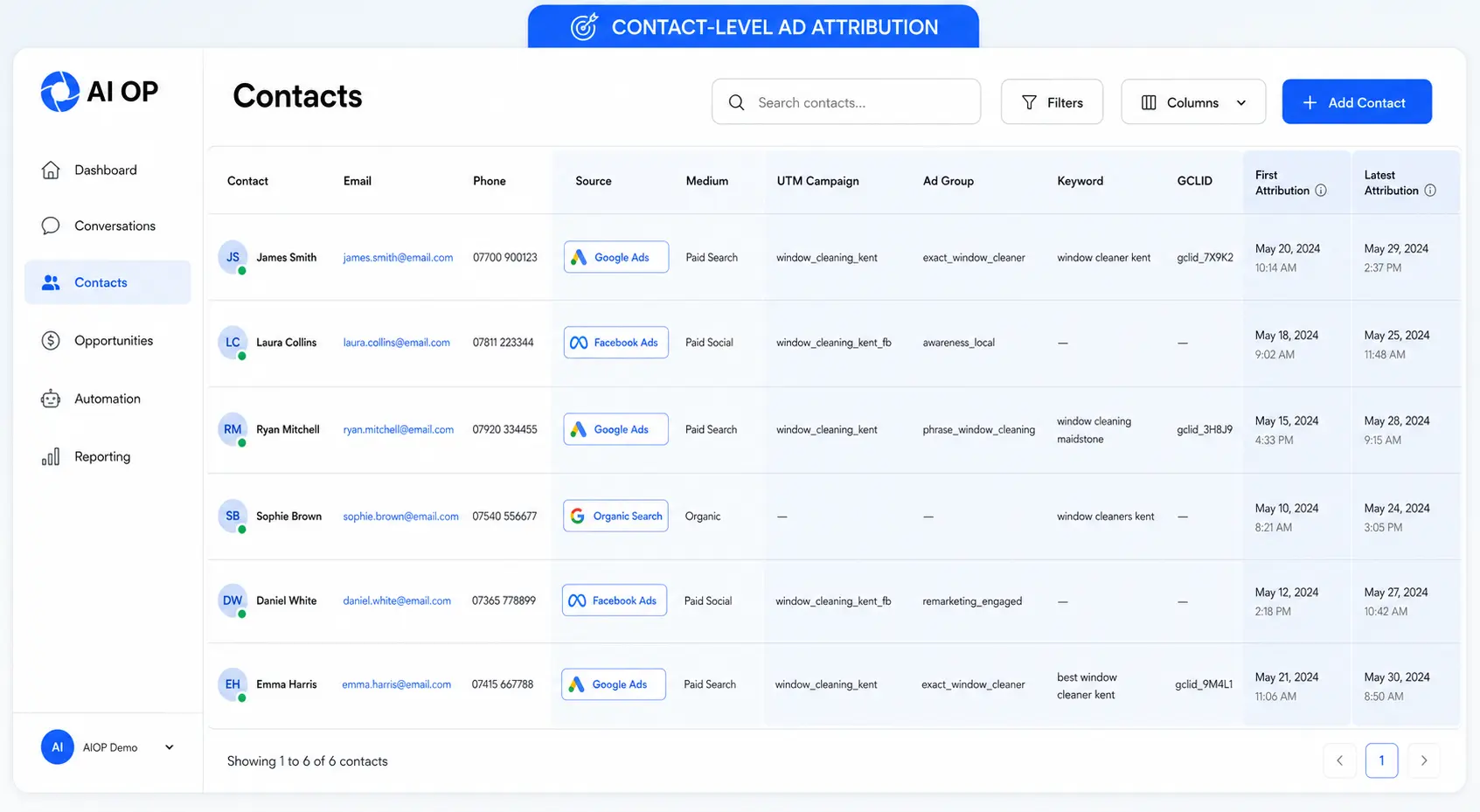
HighLevel's attribution categories are case-sensitive, so naming conventions should be standardised and tested before you rely on them for reporting. Store UTM source, medium, campaign, content, and term; campaign, ad set, and ad names/IDs; landing-page URL; and both first-touch and latest-touch attribution at the contact level.
Instant Forms are the exception. Because they don't send the person through a website URL, standard UTM tracking doesn't apply. Attribution instead comes from the direct Facebook integration and lead-form metadata — the Page, the specific form, and the campaign context. This is exactly why correct integration and form mapping matter so much for Instant Forms: it's the only attribution trail you get. Validate it by submitting a real test lead through Meta's testing tools, then checking that the Page, form, field mapping, source attribution, campaign attribution, opportunity creation, workflow entry, and duplicate handling all worked correctly.
A prospect might click a Facebook video ad, come back weeks later through Instagram retargeting, submit a form, later search for the brand on Google, and finally accept a quote by email. First-touch attribution shows how the relationship began and is useful for measuring audience and creative discovery; latest-touch shows what most recently influenced the conversion. Both matter, and the original first-touch attribution shouldn't be overwritten every time a contact re-engages — maintain separate fields for a complete view.
In Highlevel, you can see a list of your contacts and how they became leads. You can also filter down on customers, to see which traffic resource is responsible for most of your customers, or channel by revenue etc.
Meta Pixel and Conversions API (CAPI)
The Meta Pixel captures browser-based events on your website — PageView, ViewContent, Lead, Schedule, InitiateCheckout, Purchase — but it's vulnerable to ad blockers and cookie restrictions. The Conversions API (CAPI) sends the same event types server-to-server, which makes it far more resilient and, crucially, able to report on things that happen well outside the browser: a phone call, a signed contract, a closed-won opportunity days or weeks after the original ad click.
The strongest setup usually isn't Pixel or CAPI — it's both together, with correct deduplication.
It helps to keep two categories of events distinct. Funnel events happen on the website — form submitted, appointment booked, checkout started, purchase completed — and connect to the Pixel/dataset tied to the website journey. CRM lead events happen inside the sales process, sometimes weeks later — lead received, contacted, qualified, converted, customer confirmed — and are what HighLevel's Facebook Conversions API workflow is built to send. A form submission and a genuinely qualified sale are very different events, and treating them the same tells Meta's algorithm the wrong story about what "success" looks like.
Mapping Pipeline Stages to Meta Events
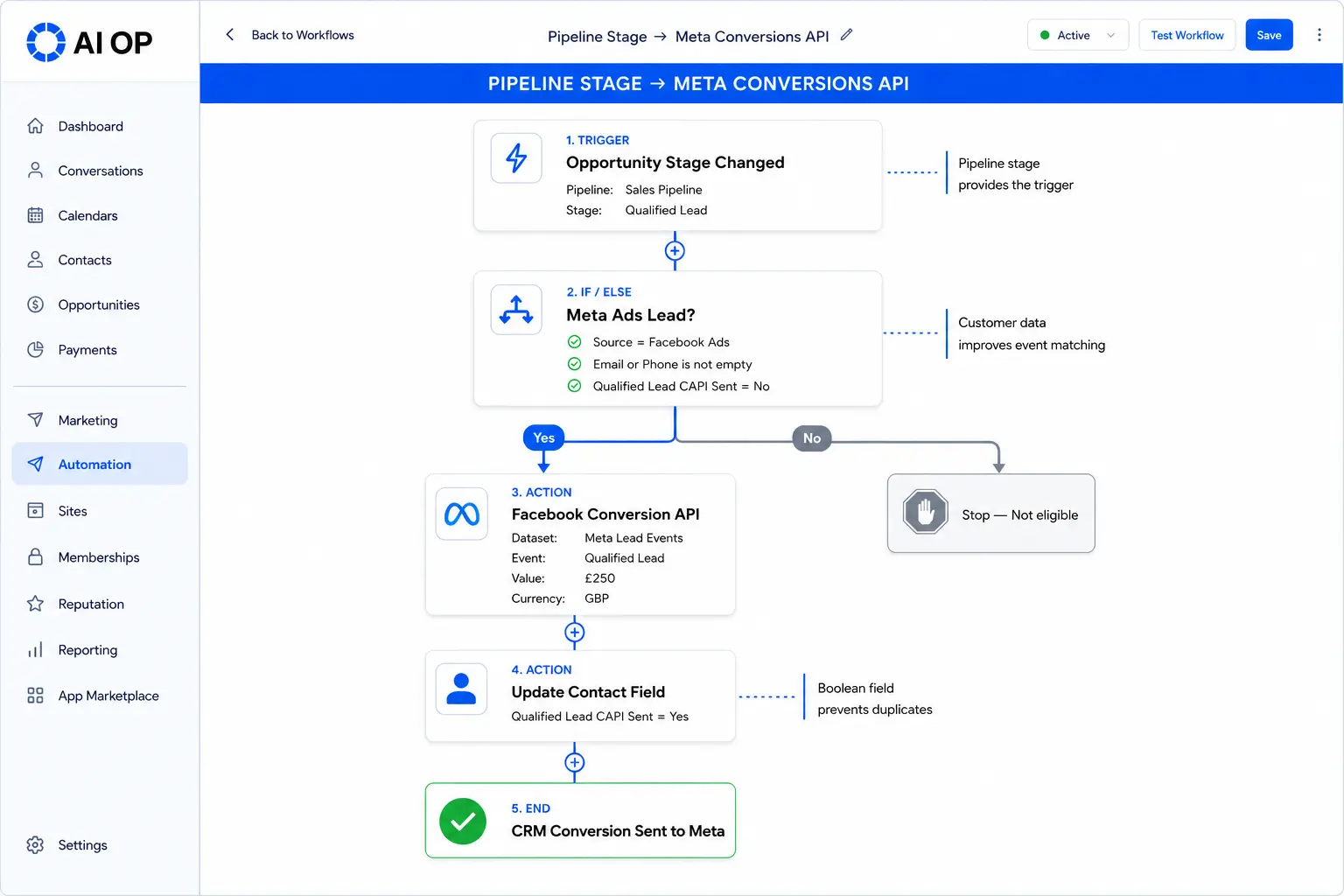
A workable mapping typically looks like this: New Lead maps to a "Lead" event, Contacted maps to "Contact," Qualified Lead maps to "Qualified Lead," Appointment Booked maps to "Schedule," Quote Accepted maps to "Converted Lead," and Closed Won maps to "Purchase" (with revenue value attached where possible).
Not every stage deserves to be sent. A good CRM event should be commercially meaningful, clearly defined, consistently applied by the whole team, backed by reliable contact data for matching, protected against duplication, tied to the correct dataset, and verified in Meta Events Manager. Internal, operational stages — "Called Once," "Task Created," "Waiting on Customer," "Follow-up Scheduled" — aren't conversion events and shouldn't be sent as if they were.
Why Qualified Lead Events Matter More Than Ever
An initial lead just means someone filled out a form. A qualified lead means the prospect meets defined criteria: correct geographic coverage, a suitable service need, valid contact details, appropriate budget, real buying authority, genuine intent, a workable timescale, and a successful sales review. When an opportunity reaches Qualified Lead, a workflow can send that event to Meta, helping the algorithm tell the difference between people who fill out forms and people worth pursuing.
Meta offers a performance goal aimed at maximising qualified leads, and it depends on a working CRM-to-CAPI connection. Meta's documentation states that from April 2026, new campaigns won't be able to select the qualified-lead performance goal without a Conversions API integration in place — making CRM feedback a functional requirement, not just a nice-to-have, for advertisers who want Meta to optimise for lead quality rather than raw form volume.
An Example Business-to-Consumer (B2C) Sales Pipeline
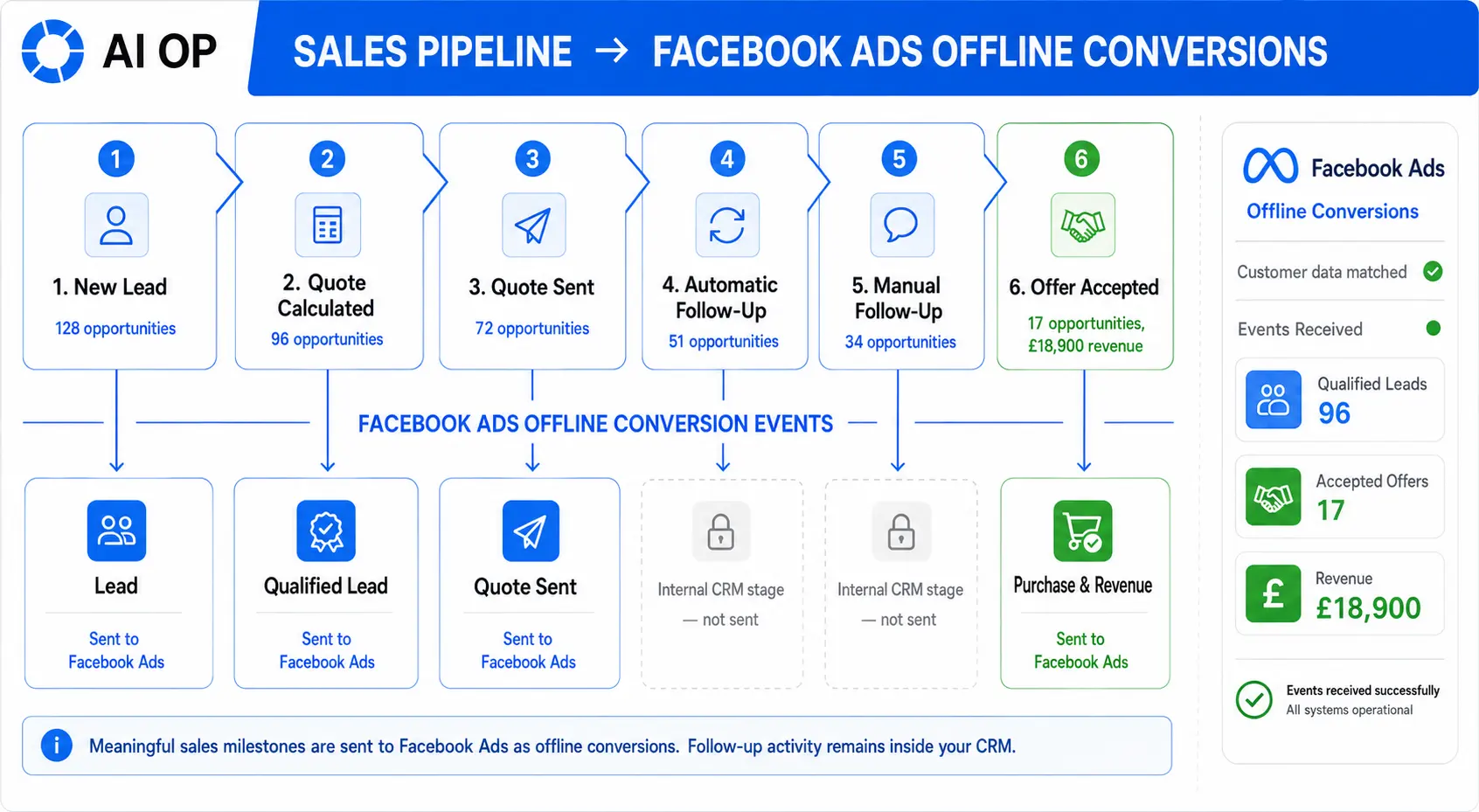
From Lead to Converted Lead to Customer
It's worth keeping four stages conceptually distinct: a Lead is an enquiry submitted; a Qualified Lead meets your sales criteria; a Converted Lead has accepted your commercial offer (deposit, contract, subscription); and a Customer / Purchase is a fully confirmed sale. This progression is the backbone of everything downstream — reporting, audience building, and campaign optimisation.
Sending Revenue Back to Meta
Lead counts hide differences in customer value. Picture Campaign A generating 100 leads, 5 customers, and £4,000 in revenue, against Campaign B generating 55 leads, 12 customers, and £18,000 in revenue. Campaign A has the lower cost per lead; Campaign B is commercially superior by a wide margin.
Where your workflow, event type, and dataset support it, a completed sale can pass value and currency data back to Meta — sourced from opportunity value, quote value, deposit amount, actual payment received, contract value, or a custom revenue field. Confirmed revenue is the safest starting point; estimated lifetime values can supplement strategy but only with a documented, consistent methodology, since inflated or inconsistent values will actively mislead value-based optimisation.
An Example Business-to-Business (B2B) Sales Pipeline
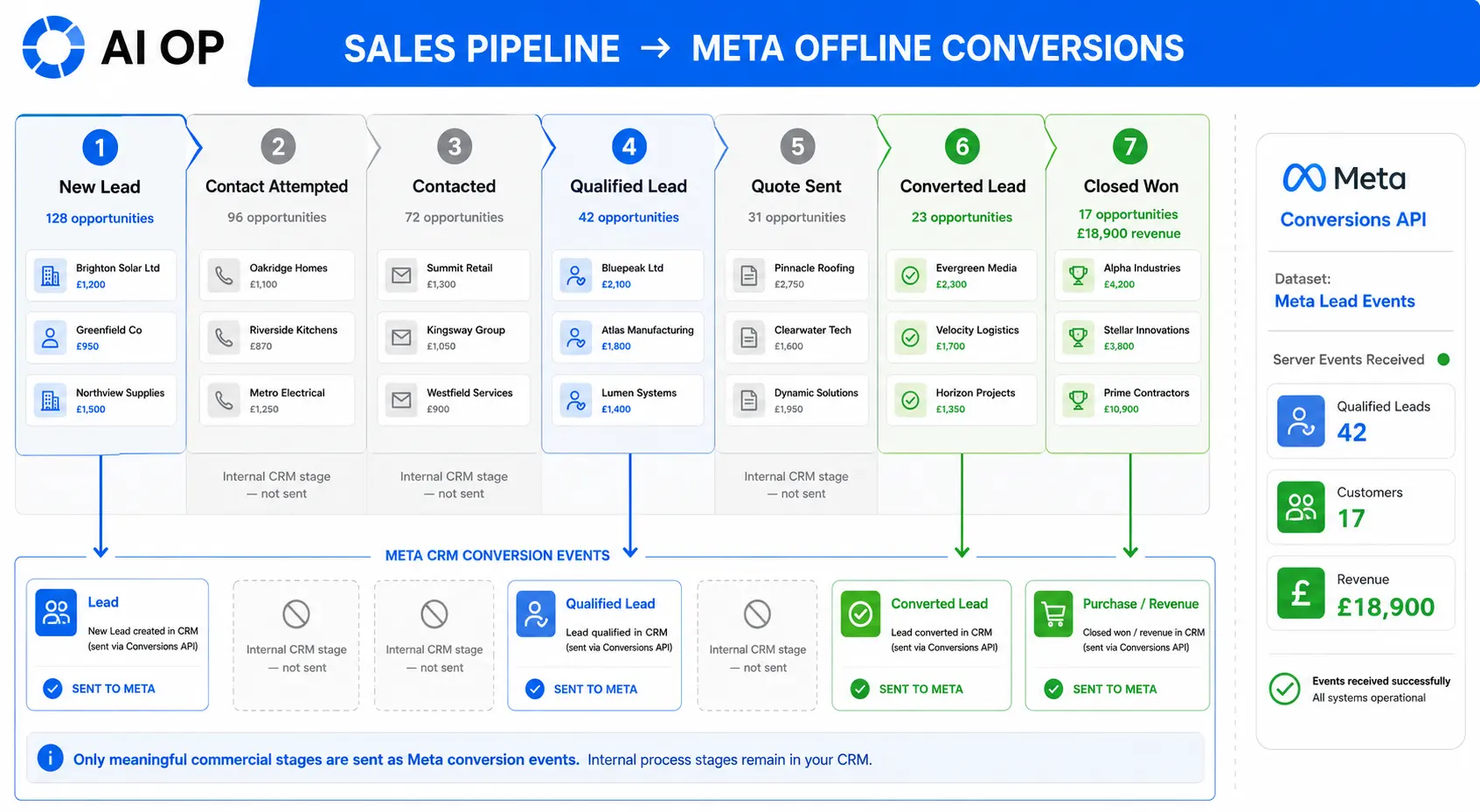
Deduplication: Don't Let One Sale Count as Two
If the same conversion is sent through both the Pixel and CAPI without a shared identifier, Meta may count it twice. Deduplication depends on matching event name, event ID, dataset/pixel ID, and timing information.
Common causes of duplication include a Pixel "Lead" event and a CAPI "Lead" event firing without a shared Event ID, multiple workflows sending the same event, a contact re-entering the same pipeline stage, both a form and its thank-you page firing identical events, a closed-won opportunity being reopened and marked won again, or test contacts accidentally entering live workflows. A practical safeguard is adding fields to the contact record — Qualified Lead Event Sent, Converted Lead Event Sent, Purchase Event Sent, Revenue Event Sent — and having each workflow check the relevant field before sending, then update it afterward.
Event Match Quality
Meta has to match the customer information in a server event against a real Facebook or Instagram account. Useful signals include email, phone, first and last name, city, postcode, country, browser identifiers (fbc, fbp), click identifiers (fbclid), and your own external ID. Meta's Event Match Quality score reflects how well that matching is working — but a high score doesn't automatically mean the rest of the setup is correct. Event names, values, deduplication status, and business logic all still need independent validation.
Speed to Lead: The First Five Minutes
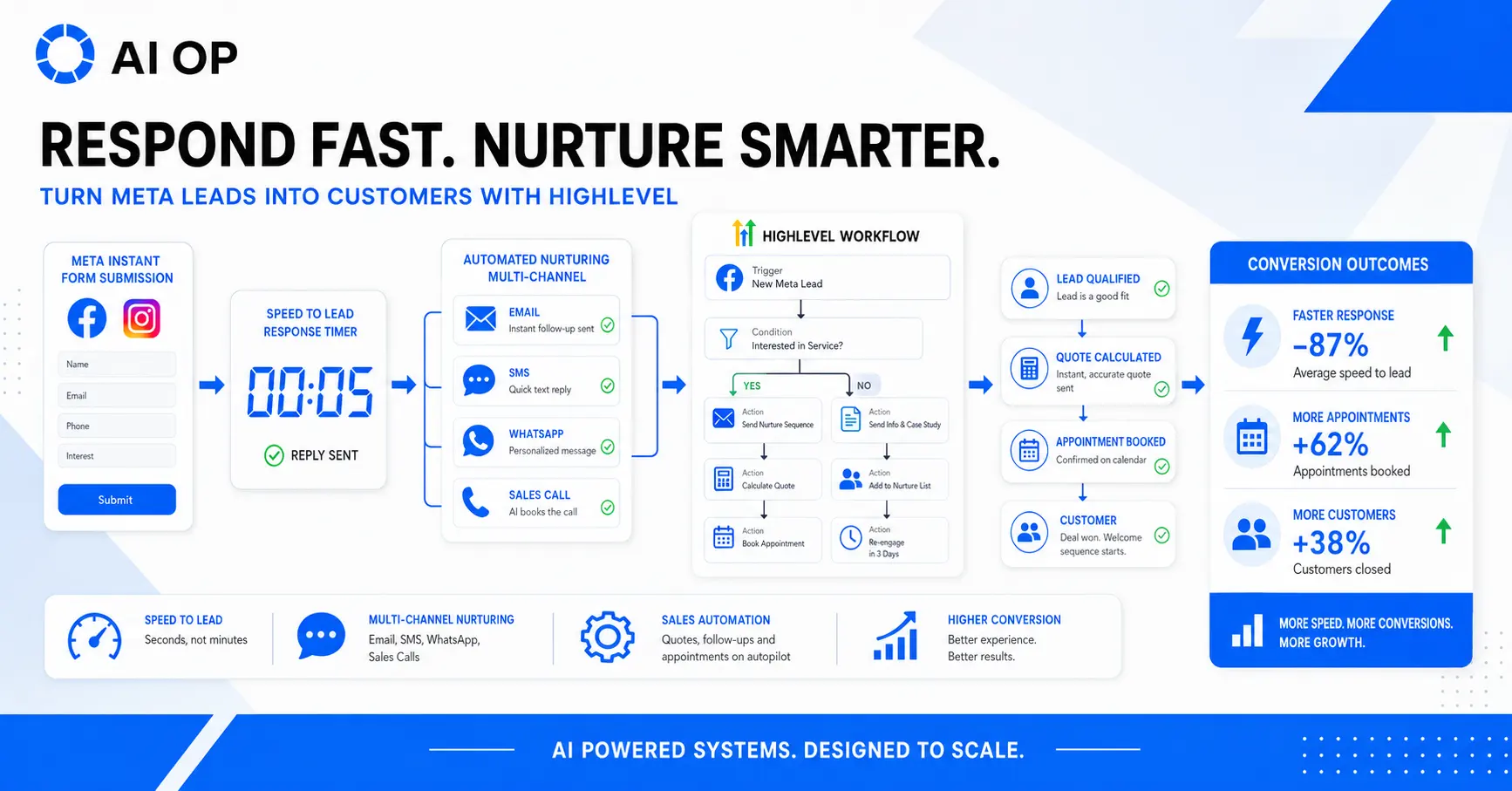
Facebook leads need fast follow-up more than almost any other channel. Instant Forms are deliberately low-friction, which also means people often submit several forms at once while comparing suppliers — and can forget which ad they even responded to within minutes.
A workflow can respond within seconds: an email or SMS acknowledgement, an approved WhatsApp message, confirmation of the requested service, an initial quote, a booking link, salesperson assignment, a call task, an internal alert, or escalation for a lead that's gone untouched.
Worth measuring: time to automated acknowledgement (target under 30 seconds), time to first human contact (target under 5 minutes), percentage contacted within 5 minutes (target above 70%) and within 1 hour (target above 90%), telephone contact rate, SMS reply rate, and — most usefully — appointment and conversion rates segmented by response time. This turns "we follow up quickly" from a vague intention into something you can actually verify.
Lead Nurturing: Converting Non-Responsive Leads
Most Facebook leads won't answer the first call or buy immediately. A structured nurture sequence stops good leads from being discarded prematurely.
A short-term sequence (days 0–14) might run: immediate confirmation and salesperson notification, a first call attempt within the hour followed by SMS with a calendar link if there's no answer, a second call attempt and an FAQ/testimonial email on day one, a third call attempt and SMS re-engagement on day three, a case-study email on day seven, a special-offer SMS on day ten, and a final call attempt with a "last chance" email on day fourteen.
A longer sequence (days 15–90) can layer in FAQs addressing common objections, video testimonials and case studies, detailed value propositions, seasonal reminders, re-engagement offers with new incentives, and cross-sell introductions.
Critically, the workflow needs clear stop conditions: the contact replies, a team member replies manually, an appointment is booked, a quote is accepted, the opportunity moves to a converted stage, payment is received, the person opts out, the lead is disqualified, or a defined nurture period simply expires. A workflow that keeps firing automated sales messages after someone has already replied — or already bought — is one of the fastest ways to damage trust in an otherwise well-built system.
Unified Conversations and Calendar Booking
HighLevel can bring Messenger, Instagram DMs, WhatsApp, SMS, email, and website chat into a single contact timeline. A lead might respond to an ad via Messenger, continue on WhatsApp, and accept a quote by email — keeping all of it attached to one contact record is what lets a salesperson pick up the full context instantly instead of piecing it together across five apps.
Instant Forms can also connect to appointment booking through a "Book Time" call-to-action. The resulting appointment can trigger confirmations, reminder sequences, internal notifications, and post-appointment follow-up — useful for consultations, estimates, site visits, demos, and sales calls. This also extends what you can measure beyond the lead itself: calendar page views, appointments booked, confirmed, and attended, qualified appointments, and eventual customers.
Sales Automation and Automated Quoting
Beyond initial follow-up, workflows can automate lead qualification and scoring, opportunity creation, pipeline movement, quote calculation and delivery, contract delivery via e-signature, payment collection, internal approvals for unusual quotes, onboarding handover, review requests, and renewal management. Better lead handling increases customer volume without increasing ad spend — if a campaign generates 100 leads at £20 with a 3% conversion rate (3 customers), improving handling to a 6% conversion rate doubles customers at the same media cost, effectively halving customer acquisition cost.
Worked example: a window-cleaning business collects property type, bedroom count, cleaning frequency, rear access, conservatory, extension, and location through a Facebook Instant Form. A workflow can wait for the fields to populate, validate the property type, calculate a base price and apply a frequency multiplier and supplements (conservatory, extension, rear access), store the results in custom fields (four-weekly, eight-weekly, one-off, and add-on pricing), route unusual properties to manual review, send the quote by email/SMS/WhatsApp, and move the opportunity to "Quote Sent."
It's worth separating calculation logic from communication logic into two distinct workflows — one calculates and stores values, the other handles messaging and follow-up. This makes each piece easier to test independently, prevents a pricing error from corrupting your communication logic, and lets you update pricing without rebuilding nurture sequences.
Designing the Opportunity Pipeline
A pipeline built around Facebook leads might run: New Lead → Contact Attempted → Contacted → Qualified Lead → Quote Calculated → Address Required → Quote Sent → Appointment Booked → Proposal Accepted → Converted Lead → Closed Won / Closed Lost / Manual Quote Required.
Every stage needs a definition precise enough that two different salespeople would apply it identically. New Lead means a valid enquiry has been received; Contacted means meaningful contact has been established, not just a dial attempt; Qualified Lead means the prospect meets agreed criteria; Quote Sent means a formal price has been supplied; Converted Lead means the offer has been accepted; Closed Won means the sale is confirmed; Closed Lost means the opportunity has genuinely ended (explicit decline, 90 days unresponsive, or disqualification). Clear definitions aren't just good practice — they're a prerequisite if any of these stages are going to be sent to Meta as conversion events.
Lifecycle status often needs to live at two levels. A simple contact-level field can track New Lead → Qualified Lead → Converted Lead → Customer → Closed Lost, while the opportunity pipeline can be more granular underneath it. A controlled, one-way sync is generally easier to govern than two-way sync: treat the contact-level field as the source of truth, and let a workflow move the corresponding opportunity when it changes, rather than letting opportunity stages overwrite the contact field automatically. This improves reporting consistency, reduces data conflicts, simplifies workflow triggers, prevents automation loops, and keeps both CAPI event logic and audience segmentation reliable.
Closed-Loop Reporting
Meta gives you campaigns, ad sets, ads, creative, impressions, reach, clicks, spend, and platform-reported conversions. HighLevel gives you contacts, attribution, conversations, response times, qualification outcomes, appointments, quotes, opportunity stages, customers, and revenue. Combined, they support metrics neither platform can produce alone: cost per contacted lead, cost per qualified lead, cost per appointment, cost per converted lead, customer acquisition cost, revenue per lead, revenue per customer, lead-to-customer rate, and true ROAS.
Revisit the earlier example with full CRM data attached: Campaign A spends £2,000 for 100 leads, 20 qualified, 4 customers, and £5,000 revenue (250% ROAS). Campaign B spends £2,500 for 60 leads, 32 qualified, 11 customers, and £18,000 revenue (720% ROAS). Without CRM data, Campaign A looks stronger on lead volume and cost per lead. With closed-loop reporting, Campaign B is obviously the better investment — more qualified leads, more customers, and roughly three times the revenue per pound spent.
Meta and HighLevel will rarely show identical totals, and that's expected rather than a sign something is broken. Differences come from attribution windows, view-through vs. click-through conversions, cross-device activity, consent and privacy restrictions, event-matching quality, duplicate contacts, and simple timing differences between ad click, lead date, and sale date. The goal isn't to force the two systems into agreement — it's to understand what each one actually measures, use HighLevel as the source of truth for revenue and customer outcomes, use Meta as the source of truth for delivery and algorithmic optimisation, and treat a 10–20% variance as normal and manageable.
A useful lead-to-revenue dashboard tracks spend/reach/impressions at the advertising stage, clicks/CTR/CPC at engagement, leads and cost per lead at generation, contact rate and speed to lead at the contact stage, qualified leads and cost per qualified lead at qualification, appointments/quotes/converted leads at the sales stage, customer acquisition cost at the customer stage, and sales value/ROAS at the revenue stage — giving marketing and sales a shared definition of success instead of marketing celebrating volume while sales is quietly frustrated by quality.
Custom Audiences and Lookalike Audiences
HighLevel segments — all leads, qualified leads, quote recipients who haven't converted, appointment bookers, converted leads, existing customers, high-value customers, lapsed customers, lost opportunities — can be uploaded to Meta as Custom Audiences, matched on email, phone, name, city, postcode, and country. Typical uses include retargeting non-converted leads, re-engaging quote recipients with a limited-time offer, cross-selling to existing customers, running win-back campaigns for lapsed customers, and — just as importantly — excluding customers and already-quoted leads from acquisition campaigns. A customer who's already accepted a quote shouldn't keep seeing ads inviting them to request the same quote again.
A Lookalike Audience finds new people who resemble a source audience, so the quality of that source matters enormously. A source built from every HighLevel contact — mixed with spam, suppliers, job applicants, and people outside your service area — dilutes the signal. A cleaner seed is closed-won customers, customers with above-average order value, repeat purchasers, customers retained 12+ months, customers from your most profitable service line, or sales-qualified leads if customer volume alone is too small. Meta generally recommends a source audience of roughly 1,000–5,000 people, with recency and single-service focus improving quality further. Quality beats quantity here: 1,000 excellent customers will consistently outperform 50,000 mixed contacts as a Lookalike seed.
A one-off export starts going stale the moment it's created. A sustainable process needs defined inclusion and exclusion criteria, consent verification, regular refreshes (weekly or biweekly), invalid-data removal, consistent formatting, match-rate monitoring, clear naming conventions, documented update dates, and suppression rules for opted-out contacts.
Testing the Complete Integration
CRM events shouldn't be used for campaign optimisation until the entire chain has been verified end to end. Confirm the correct Facebook Page, ad account, and dataset/pixel are connected. Submit an Instant Form test lead through Meta's testing tools, confirm the contact is created, and check every mapped field, campaign attribution, opportunity creation, owner assignment, and internal notification. Test the immediate email, SMS, and WhatsApp responses, along with quote calculation and stored values.
Then move a test opportunity to Qualified Lead and confirm the correct CAPI workflow fires and appears in Meta Events Manager; move it to Converted Lead and confirm the deeper event fires; add a sale value, move it to Closed Won, and confirm the final event and value transmit correctly. Repeat stage movements to confirm duplicate protection actually works, and check Event Match Quality. Finally, build a test Custom Audience and check inclusions/exclusions, and reconcile Meta-reported leads against HighLevel contacts to identify and resolve any discrepancies. Meta's Test Events tool is purpose-built for checking website, CRM, and server-side events sent through the Conversions API — use it before trusting any of this for live optimisation.
Common Implementation Problems
Most Facebook-to-HighLevel problems are data and process failures, not integration failures. The usual suspects:
Wrong Facebook Page, ad account, or dataset/pixel connected — usually a Business Portfolio asset-ownership issue
Missing lead access permissions, separate from Page or ad-account access
Unmapped or mis-mapped Instant Form fields, especially on forms created after the initial integration
Historical leads imported unexpectedly because "import existing" was left selected
Duplicate contacts or duplicate opportunities from missing deduplication rules or workflows triggering on any update rather than just creation
Missing or inconsistent UTM parameters, and non-unique or generic campaign names ("Campaign 1," "Test")
Pixel and CAPI events double-counted from a missing shared Event ID
The wrong CAPI event selected for a given stage (Lead vs. Qualified Lead confusion)
Inconsistent pipeline-stage usage across the sales team from vague stage definitions
Workflows re-sending the same event repeatedly due to missing "event sent" protection fields
Blank revenue values or wrong currency because the opportunity value field wasn't made mandatory
Sales staff not updating the pipeline, with no accountability or dashboard visibility
Test contacts leaking into live reporting
Stale, unrefreshed customer lists and weak, unfiltered Lookalike seed audiences
Existing customers not excluded from acquisition campaigns
Attribution models compared incorrectly — for example, Meta's 7-day click window against HighLevel's first-touch field
A technically well-connected Facebook account cannot compensate for poor field mapping, vague lifecycle definitions, or inconsistent pipeline discipline. Most failures here are organisational, not technical.
Data Protection and Consent
A UK implementation needs to account for UK GDPR, the Privacy and Electronic Communications Regulations (PECR), and Meta's own customer-data policies. That means real attention to cookie consent for Pixel tracking, marketing consent captured on lead forms (never pre-ticked), functioning email unsubscribe and SMS opt-out processes, documented WhatsApp consent, call-recording notices where applicable, data minimisation, defined retention limits, restricted access permissions, a lawful basis for Custom Audience uploads, avoidance of sensitive personal data unless essential and lawful, and a process for handling deletion requests within 30 days.
Having someone's details sitting in HighLevel doesn't automatically mean those details can be used for any advertising purpose you like. Only collect and share the data actually required for a defined marketing or measurement purpose, and be able to explain that purpose if asked.
Final Thoughts: From Lead Generation to Revenue Marketing
The real value of connecting Facebook and Instagram Ads to HighLevel isn't that Instant Form leads land in a CRM automatically. It's that the entire customer journey becomes connected, measurable, and improvable.
Meta generates attention and enquiries through creative, targeting, and placement. HighLevel operationalises the relationship — recording contacts, responding within seconds, managing every conversation across channels, calculating quotations, coordinating follow-up, and tracking opportunities through a disciplined pipeline. HighLevel then feeds intelligence back to Meta: qualified leads, converted leads, customers, purchases, and revenue create a feedback loop that teaches the algorithm what a valuable customer actually looks like. And HighLevel powers smarter audiences — CRM lists become Custom Audiences for retargeting and exclusion, and high-value customer segments become Lookalike seeds for prospecting.
Once that loop exists, the questions change completely. Instead of "which campaign has the lowest cost per lead?" you can ask which campaigns generated qualified prospects, which ads produced paying customers, which creative generated the most revenue, which leads required the least sales effort, which customers should be excluded from acquisition targeting, which high-value customers should seed a Lookalike Audience, what each customer actually cost to acquire, and which campaigns delivered the strongest true return on ad spend.
That shift — from judging campaigns by form fills to judging them by revenue — is the entire difference between basic Facebook lead generation and closed-loop marketing. Meta shouldn't optimise toward whoever is most likely to tap a form. Given the right CRM feedback, it can optimise toward whoever is most likely to become a genuinely valuable customer. HighLevel is the operational layer that makes that possible.
The loop, in short: Advertise → Capture → Qualify → Convert → Feedback → Improve → Advertise. Build it with discipline. Measure it with rigour. Optimise it for revenue.