
HighLevel for Small Businesses: The Complete Guide to CRM, Automation, AI and the All-in-One Business Stack
Small businesses rarely suffer from a shortage of software. The more common problem is that they have accumulated too much of it.
Leads arrive through a website form, Facebook Lead Ads, Google Ads, telephone calls, WhatsApp, social media messages and referrals. Customer details are copied into spreadsheets. Appointments sit in a separate calendar. Email marketing runs through another subscription. Quotes and payments may be handled elsewhere. Staff communicate through personal inboxes and mobile phones. Reporting requires information from several systems that never quite agree.
Each individual tool may work, but the business as a whole remains disconnected.
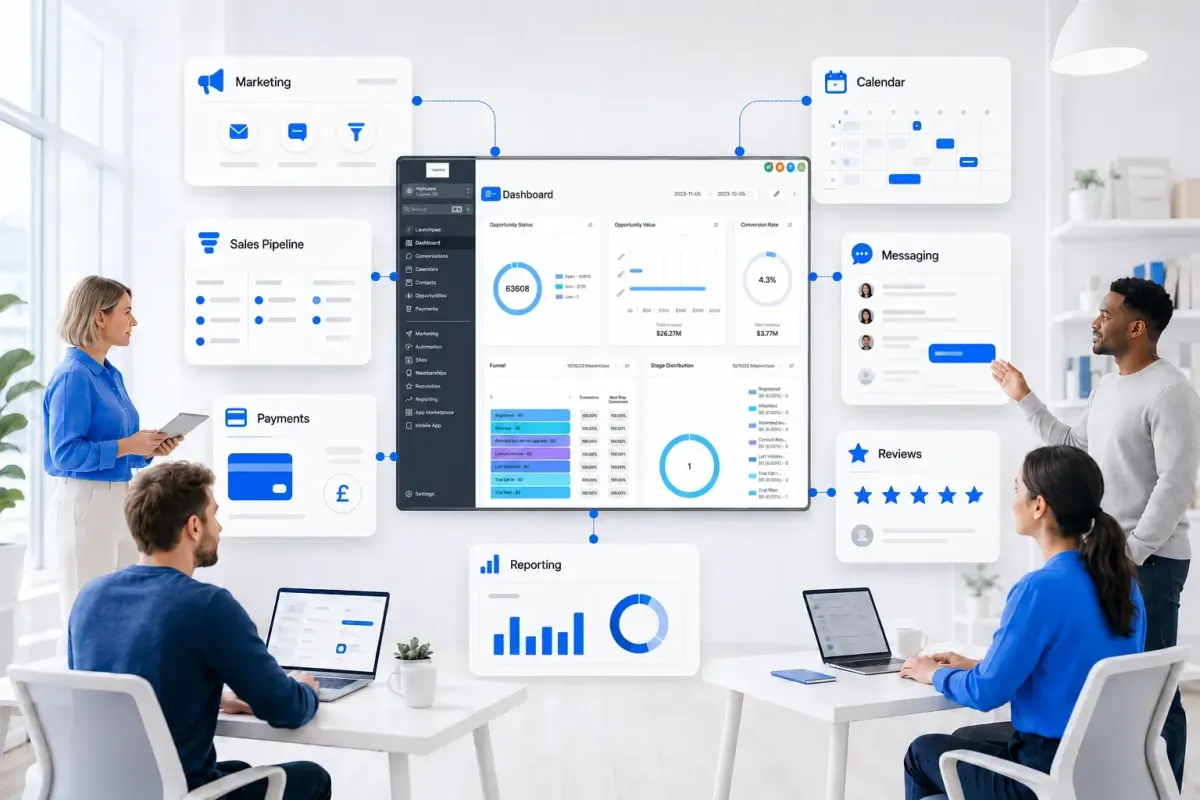
HighLevel offers a different approach. It combines customer relationship management, marketing, sales pipelines, communications, websites, funnels, calendars, payments, reputation management, workflow automation and artificial intelligence within one connected environment.
This is why describing HighLevel as simply a CRM is increasingly inadequate. For many small businesses, a more accurate description is an AI business operating system: a central operational layer that connects the customer journey, coordinates routine work and gives the team one shared source of truth.
This guide explains how small businesses can use HighLevel across marketing, sales, service and operations. It is written particularly for companies with fewer than 20 employees, where people often perform several roles and the cost of fragmented systems is felt most acutely.
What Is HighLevel?
HighLevel is an all-in-one sales, marketing and business automation platform. It was initially adopted heavily by marketing agencies and local service businesses, but its use has expanded across trades, professional services, appointment-led businesses, consultants, clinics, smaller B2B companies and other organisations that need to manage leads and customers efficiently.
At its core, HighLevel provides:
Contact and company records
Sales pipelines and opportunities
Websites, funnels and landing pages
Forms, surveys and quizzes
Online calendars and appointment booking
Email, SMS, telephone, WhatsApp and social messaging
A unified conversations inbox
Marketing campaigns and automated follow-up
Workflow automation
Payment collection, invoices and recurring payments
Reputation and review management
Memberships, courses, communities and client portal
Call tracking and telephone services
Reporting, attribution and dashboards
Artificial intelligence for conversations, voice, content and workflow decisions
Integrations with external business systems
The value is not merely having these features in one login. The larger benefit is that the components can share data and trigger one another.
A form submission can create a contact, preserve the marketing source, open an opportunity, assign an owner, send an immediate acknowledgement, start a follow-up sequence, notify a staff member and invite the prospect to book an appointment. If the appointment is booked, the system can stop the original sequence, send reminders and move the opportunity into the next pipeline stage.
That connected behaviour is what turns a collection of features into an operating system.

Why HighLevel Is Particularly Relevant to Companies With Fewer Than 20 Employees
Large organisations often have separate marketing, sales, customer service, finance, operations and IT departments. A small company may have the same business functions, but only a handful of people to perform them.
The owner might supervise advertising, answer sales enquiries and approve quotes. An administrator may manage appointments, customer communication and payment queries. A salesperson might also handle onboarding and account management. When responsibilities overlap, disconnected software creates additional work and makes ownership less clear.
HighLevel is well suited to this environment because it allows a lean team to coordinate several customer-facing functions without building a complex enterprise technology stack.
For a smaller business, the practical benefits can include:
Fewer subscriptions and logins
Less duplicated data entry
Faster responses to new enquiries
More consistent lead follow-up
Clearer ownership of contacts and opportunities
Better visibility across marketing, sales and service
Fewer leads lost between systems
More reliable appointment reminders
Standardised onboarding processes
More consistent review and referral requests
Easier reactivation of older customers
Greater capacity without immediately increasing headcount
This does not mean every company should replace every application it uses. HighLevel is strongest as the central customer acquisition, communication and revenue-operations layer. Specialist accounting, inventory, project delivery, field-service, business intelligence or industry-specific software may still remain necessary.
The objective is not to force the entire company into one application. It is to decide which processes HighLevel should own, which external systems should remain, and how information should move between them.
From Software Stack to Business Operating System
A traditional small-business software stack often grows incrementally. The company adds an email marketing platform, a calendar tool, a form builder, a CRM, a call-tracking product, a review system and an automation connector at different times.
The result may look functional from the outside, but it introduces hidden operational costs:
Contact data becomes inconsistent across applications.
Staff cannot see the complete history of a customer.
Automations break when a field or integration changes.
Reporting uses different definitions in different systems.
Customers receive duplicated or contradictory messages.
The business becomes dependent on one person who understands how everything connects.
An operating-system approach starts with the process rather than the product.
The business first defines how a person moves from initial awareness to enquiry, qualification, sale, fulfilment, retention, review, referral and reactivation. HighLevel is then configured to support that lifecycle using shared records, defined stages, communication channels and workflows.
The difference is important. Installing HighLevel does not automatically create an operating system. The operating system emerges from the design of the CRM, data, pipelines, workflows, integrations, permissions and reporting.
The Five-Part Customer Lifecycle in HighLevel
A useful way to understand the platform is to divide the customer lifecycle into five connected phases:
Capture
Nurture
Close
Deliver and evangelise
Reactivate
Each phase uses different HighLevel capabilities, but all of them should operate on the same underlying customer data.
1. Capture: Bring Every Enquiry Into One System
The first requirement is to capture demand consistently across every relevant channel.
HighLevel can receive leads through:
Website and landing-page forms
Surveys and quizzes
Calendar bookings
Website chat
Inbound telephone calls
SMS and WhatsApp
Facebook and Instagram messages
Google and Facebook lead-generation campaigns
QR codes
Manual contact creation
Imports
Integrations, webhooks and APIs
The purpose is not simply to create a contact. A useful lead record should also contain the context needed to act:
Which service is the person interested in?
Which location or territory applies?
Where did the enquiry originate?
Which campaign, advert, keyword or referral produced it?
Is the person ready to buy, researching, or asking for support?
Who should own the next action?
Has consent been captured for the relevant communication?
Standardising lead capture makes everything downstream more reliable. If one source sends a full name, another sends separate first and last names, and a third omits the requested service, workflows and reporting become inconsistent.
Every lead source should therefore be tested against a defined minimum-data standard before automation is expanded.
2. Nurture: Follow Up Quickly and Consistently
Many small businesses do not lose sales because demand is too low. They lose them because responses are slow, follow-up is inconsistent or prospects are forgotten after the first contact.
HighLevel workflows can acknowledge an enquiry immediately and then coordinate a structured sequence across email, SMS, WhatsApp, telephone tasks and other supported channels.
A typical enquiry workflow might:
Confirm that the request has been received.
Notify the correct team member.
Assign the contact and opportunity.
Send a booking link or request missing information.
Create a call task for a salesperson.
Follow up if the person has not replied.
Stop the sequence when the desired action occurs.
escalate the lead if it reaches a high-intent condition.
Automation should support human selling rather than overwhelm the prospect. A five-minute response is valuable; five simultaneous messages across different channels are not.
Good nurture design includes clear entry conditions, sensible delays, channel preferences, stop conditions, reply detection, contact-time restrictions and frequency controls.
3. Close: Turn Enquiries Into Customers
HighLevel pipelines provide a visual representation of the sales process. Each opportunity should sit in a stage that describes its current commercial status.
A straightforward service-business pipeline might include:
New Lead
Contacted
Qualified
Consultation Booked
Quote Sent
Decision Pending
Won
Lost
The exact stages should reflect how the company actually makes money. They should not be copied blindly from a generic template.
Pipeline stages are most useful when each stage has:
A clear definition
An identifiable owner
A required next action
An expected timeframe
An entry rule
An exit rule
A meaningful reporting purpose
HighLevel can support the sales process with calendar bookings, reminders, estimates, proposals, invoices, payment links, electronic documents and automated follow-up. It can also trigger internal notifications or tasks when an opportunity becomes inactive or remains in one stage for too long.
For smaller teams, this creates a shared sales operating rhythm. Instead of asking whether someone followed up, the team can see the next action and the current status directly in the system.
4. Deliver and Evangelise: Coordinate Onboarding, Service and Reviews
The customer journey should not stop when an opportunity is marked as won.
HighLevel can initiate a structured handover from sales into onboarding or service. Depending on the business, this might include:
Sending a welcome message
Requesting documents or additional information
Issuing an agreement or payment request
Booking an onboarding call
Creating internal tasks
Updating a customer status field
Moving the record into a delivery pipeline
Providing access to a client portal, course or membership
Sending progress communications
Requesting feedback
Asking satisfied customers for a review
This is particularly useful when a small team has no dedicated onboarding department. A workflow can ensure that the same essential steps occur every time, while staff handle exceptions and higher-value conversations.
Reputation management can then be integrated into the lifecycle. Review requests should be sent at a moment when the customer has experienced value, not merely a fixed number of days after purchase.
The same process can also identify unhappy customers and route them into a service-recovery path before asking for a public review.
5. Reactivate: Generate Revenue From Existing Data
Many companies focus heavily on acquiring new leads while underusing the contacts already stored in their database.
HighLevel can segment and reactivate:
Previous customers
Unconverted enquiries
Lapsed subscribers
Expired quotes
No-show appointments
Customers approaching a renewal date
Buyers who may need a related service
Contacts who previously engaged but were not ready to proceed
A reactivation campaign should be based on relevance, consent, timing and customer history. It should not treat the entire database as one undifferentiated mailing list.
When correctly designed, reactivation can be one of the highest-return uses of the platform because the business is communicating with people who already know the company or previously expressed interest.

CRM: Creating a Reliable Source of Truth
The CRM is the data foundation beneath every HighLevel function.
If the records are incomplete, duplicated or poorly structured, automation simply processes bad data faster. This is why CRM design should happen before a business builds dozens of workflows.
Contacts, Companies, Opportunities and Other Records
A contact represents a person. A company record represents an organisation. An opportunity represents a potential revenue event moving through a pipeline.
These concepts should not be merged.
One person may enquire more than once, request several services or have multiple commercial opportunities over time. Their contact record should retain their identity and communication history, while separate opportunity records represent the distinct sales events.
For B2B businesses, company records and relationships become more important. Several contacts may belong to the same company but play different roles in the buying process. HighLevel's company and structured-data capabilities can support a more relationship-based model where the implementation requires it.
Custom objects may be appropriate for entities that are not adequately represented by a contact, company or opportunity. Examples might include properties, policies, vehicles, service contracts or installations. They should only be introduced when they solve a real data-model problem; unnecessary complexity makes the system harder to operate.
Custom Fields, Tags and Pipeline Stages
These tools serve different purposes:
Custom fields store factual information that the business needs to retain, report on or use in decisions.
Pipeline stages show the current commercial state of an opportunity.
Tags are useful for flexible classification, temporary states, workflow control and segmentation.
A field such as “Service Required” is generally more reliable than creating a separate tag for every service. A field can enforce a defined set of values, support reporting and remain understandable when the contact has several unrelated tags.
Tags remain valuable, but they should not become a substitute for structured CRM design. An account with hundreds of overlapping tags and no naming convention becomes difficult to manage.
A useful principle is: Fields are the source of truth. Stages represent process state. Tags support categorisation and automation.
Data Standards for a Small Business
Even a company with five employees should define:
Required contact fields
Field formats and permitted values
How telephone numbers are stored
How addresses are structured
How lead sources are classified
How owners are assigned
How duplicates are handled
Which record controls each status
Which data may be overwritten
How long data is retained
Who can access or export it
This need not become a large governance project. A short data dictionary and a clear naming convention can prevent months of later confusion.
Pipeline Design That Reflects the Real Business
A CRM should reflect how the business actually makes money.
If a roofing company visits a property, provides an estimate and waits for a decision, its pipeline should represent those events. If a clinic qualifies an enquiry, books a consultation and converts the person into a treatment plan, its stages should be different.
Avoid creating stages for every minor task. Pipeline stages should describe meaningful changes in commercial state, while tasks and fields capture supporting activity.
Where possible, stage names should make completed states unambiguous. “Quote Sent” is clearer than “Quote”, and “Consultation Booked” is clearer than “Consultation”.
It is also important to decide whether the contact status or the opportunity stage controls an automation. If both can change independently without a defined synchronisation rule, the CRM may show contradictory information.

HighLevel Automation: Turning Processes Into Workflows
Automation is one of HighLevel's central strengths. Its workflow engine can listen for events, evaluate conditions and perform actions across the platform.
Common workflow triggers include:
Form submitted
Contact created or changed
Tag added or removed
Opportunity created or moved
Appointment booked, cancelled or missed
Customer replied
Payment received or failed
Document completed
Review submitted
Inbound webhook received
Date or anniversary reached
Workflow actions can then update records, send communications, create opportunities, assign users, add tasks, move pipeline stages, call webhooks, process payments or pass data to supported integrations.
Deterministic Automation and AI Are Not the Same
Traditional automation follows explicit rules:
If a quote is accepted, move the opportunity to Won, notify operations and begin onboarding.
This is deterministic. Given the same inputs and conditions, the workflow should produce the same result.
AI-assisted automation handles less structured inputs:
Read the customer's message, identify whether it expresses booking intent, a complaint or a general question, and select the appropriate workflow path.
This is probabilistic. The model interprets language and returns a judgement that may require confidence thresholds, validation or human review.
Both are valuable, but they should not be confused.
Deterministic automation is usually preferable for:
Payment status
Contract completion
Appointment state
User assignment
Pipeline movement based on confirmed events
Compliance-critical communications
Data synchronisation
AI can be particularly useful for:
Classifying free-text enquiries
Summarising calls and conversations
Extracting structured information from messages
Suggesting replies
Answering frequently asked questions
Identifying intent or sentiment
Qualifying and routing leads
Deciding which approved branch of a workflow is most relevant
The strongest operating systems combine structured data, deterministic workflows, AI judgement and human oversight.
How to Design Reliable HighLevel Workflows
Reliable workflows are modular and purpose-specific.
One enormous automation that handles lead capture, qualification, booking, sales, onboarding, reviews and reactivation may initially appear efficient, but it becomes difficult to test and maintain.
A better structure separates the lifecycle into workflows such as:
New lead capture and assignment
Initial acknowledgement
Lead nurture
Appointment confirmation and reminders
Missed appointment recovery
Quote follow-up
Won-deal handover
Customer onboarding
Review request
Renewal reminder
Lapsed-customer reactivation
Each workflow should have:
A clear name and purpose
Defined entry criteria
Required data
Stop conditions
Error or exception handling
Re-entry rules
A named owner
A change log or version note
Test records and expected outcomes
Automation should also avoid circular logic. For example, Workflow A adds a tag that starts Workflow B, while Workflow B updates a field that restarts Workflow A. Safeguards, flags and re-entry restrictions are necessary where processes interact.

Communications: One Inbox Across the Customer Journey
HighLevel can centralise conversations from multiple channels against the relevant contact record. Depending on the account configuration and connected services, this can include email, SMS, WhatsApp, telephone calls, website chat and social messaging.
This gives staff a more complete view of the relationship. A salesperson can see that a prospect submitted a form, received a message, booked an appointment and later replied through WhatsApp without searching through several applications.
The unified inbox can improve:
Response times
Context for staff
Conversation ownership
Handover between colleagues
Visibility of unanswered messages
Recording of customer interactions
Workflow triggering based on replies
Channel rules still matter. Consent, opt-outs, template requirements, quiet hours, message frequency and regional regulations must be reflected in the implementation.
HighLevel makes multi-channel communication possible; it does not remove the business's responsibility to use each channel appropriately.
Missed-Call Text-Back and Telephone Workflows
For local service companies, clinics and appointment-led businesses, a missed telephone call may represent a high-intent prospect.
A missed-call text-back workflow can acknowledge the caller immediately and invite them to reply or book. This is useful when staff are driving, serving customers, working on site or handling another call.
Telephone workflows can also:
Route calls
Record call outcomes
Trigger follow-up
Create tasks
Track calls against contacts
Summarise conversations with AI
Initiate different journeys based on call status
The automation should be designed carefully to avoid sending repeated text messages when the same person calls several times within a short period.
Websites, Funnels, Forms and Lead Generation
HighLevel can act as the digital acquisition layer as well as the CRM behind it.
Businesses can use it to build:
Main websites
Campaign landing pages
Lead-generation funnels
Webinar registration journeys
Quote request pages
Forms and surveys
Booking pages
Payment pages
Membership and course areas
Some companies will build their entire website in HighLevel. Others will retain WordPress or another content-management system for the primary website and use HighLevel for forms, funnels, calendars, chat, tracking and follow-up.
Both approaches can work. The decision should consider content requirements, search-engine optimisation, design flexibility, internal skills and the existing website investment.
The essential principle is that the lead's data and attribution context should pass reliably into the CRM.
Calendars, Appointments and No-Show Reduction
HighLevel calendars allow prospects and customers to book appointments without the repeated exchange of available times.
They can support:
Consultation bookings
Sales calls
Site surveys
Treatment appointments
Service visits
Classes and events
Team or round-robin availability
Automated confirmations and reminders can reduce manual administration and help lower no-show rates. Workflows can also respond differently when an appointment is booked, rescheduled, cancelled or marked as a no-show.
A complete appointment journey may include:
Booking confirmation
Calendar invitation
Preparation instructions
Reminder messages
Internal notification
No-show recovery
Post-appointment follow-up
Pipeline and status updates
The calendar should be connected to the correct external calendar where required, and availability rules must be tested across staff, locations and event types.
Payments, Invoices and Recurring Revenue
HighLevel can support payment collection within the customer journey using connected payment services and native payment functions.
Depending on the business and account configuration, this may include:
Payment links
One-time purchases
Deposits
Invoices
Subscriptions
Recurring payments
Order forms
Products
Coupons
Payment reminders
Failed-payment workflows
This makes it possible to connect commercial events directly to the CRM. A successful payment can update an opportunity, begin onboarding, issue access to a product or notify the team.
Accounting software will often remain the financial system of record. HighLevel may control the customer-facing payment and automation journey while the accounting platform handles ledgers, reconciliation, tax and formal financial reporting.
Reputation, Reviews and Referrals
For many small businesses, online reputation has a direct effect on local visibility and conversion rates.
HighLevel can help standardise the process of:
Requesting reviews
Sending reminders
Monitoring responses
Routing unhappy customers to internal support
Responding to reviews
Tracking reputation activity
The timing should be based on a genuine customer-success event. A trades business might request a review after completion and confirmation of satisfaction. A clinic might wait until the appropriate post-treatment milestone. A recurring-service business may ask after several successful visits.
Referral requests can follow a similar logic. The strongest time to ask is generally after the customer has clearly experienced value.
Memberships, Courses, Communities and Client Portals
HighLevel is not limited to lead generation.
Businesses can use its membership, course, community and portal capabilities to deliver:
Onboarding materials
Training programmes
Client resources
Standard operating instructions
Video lessons
Downloadable documents
Paid courses
Subscription content
Customer communities
This can support online, hybrid and recurring-revenue business models. A consultant might deliver a programme through a portal, while a service company might use it for customer onboarding and support resources.
Before replacing specialist learning or community software, the company should compare its required learner management, assessment, certification, moderation and reporting capabilities.
HighLevel AI: From Assistance to Operational Work
The most significant development in business software is the movement from systems that store information to systems that can interpret information and act on it.
HighLevel's AI capabilities are most valuable when connected to CRM records, communication channels, calendars and workflows. The AI is not operating in isolation; it can participate in a defined business process.
Conversation AI
Conversation AI can help respond to enquiries through supported messaging channels, answer common questions, collect information, qualify prospects and move the conversation towards an approved outcome such as booking an appointment.
Useful applications include:
Answering service and availability questions
Collecting a postcode or service address
Identifying the required service
Asking qualification questions
Providing approved price or process information
Booking an appointment
Escalating complex or sensitive enquiries
The agent should be grounded in accurate business information and restricted from making unsupported promises. It also needs a clear handover process when confidence is low or a human is required.
Voice AI
Voice AI can provide an automated telephone receptionist or calling capability for suitable use cases.
It may be used to:
Answer common questions
Capture caller details
Qualify an enquiry
Book an appointment
Route a caller
Follow an approved script
Provide out-of-hours coverage
Voice AI should not be deployed simply because it is available. The company should consider caller expectations, disclosure, accuracy, escalation, recording, data protection and the commercial value of a human conversation.
AI for Summaries, Classification and Data Extraction
Some of the most practical AI uses are less visible to the customer.
HighLevel can use AI-assisted processes to:
Summarise a long conversation
Extract a requested service from free text
Identify a customer's likely intent
Categorise an enquiry
Create structured notes
Analyse a call
Suggest the next action
Route a lead based on the content of a message
This reduces manual reading and data entry while improving the quality of information available to workflows.
However, extracted data should be validated before it controls a sensitive or irreversible process. A model interpreting “I might be interested next month” should not automatically be treated as a confirmed booking.
Content and Marketing AI
AI can assist with:
Drafting email and SMS content
Creating social media posts
Producing initial advert variations
Suggesting campaign ideas
Rewriting content for different audiences
Supporting review responses
These features can accelerate production, but the output still requires human review for factual accuracy, brand fit, compliance and commercial appropriateness.
The strategic value of AI is not producing more content for its own sake. It is helping the business communicate more quickly and consistently while keeping humans responsible for quality.
AI Decision-Making Inside Workflows
AI can help workflows respond to unstructured information that traditional if/then rules cannot interpret easily.
For example, an incoming reply could be classified as:
Ready to book
Wants more information
Price concern
Not interested
Existing customer support
Complaint
Unclear
The workflow can then route the contact to a controlled next step.
The safest design does not give the model unrestricted control. It allows AI to select among approved actions, records the decision and sends uncertain or high-risk cases to a human.
Human Oversight Remains Essential
AI is a component of the operating system, not an autonomous replacement for business responsibility.
Human review is particularly important for:
Legal or regulated advice
Complaints
Vulnerable customers
Large commercial commitments
Unusual pricing
Refunds
Sensitive personal data
Low-confidence classifications
Brand-critical public responses
A good implementation defines what AI may do, what it may suggest and what it must escalate.
Native HighLevel Automation Versus Zapier, Make, Webhooks and APIs
HighLevel can centralise a large number of functions, but it will not replace every specialist business application.
A sensible integration hierarchy is:
Use HighLevel's native capability when it adequately owns the process.
Use an available native integration when another system must remain.
Use supported workflow integrations or marketplace applications where appropriate.
Use Zapier or Make for cross-application processes that are not covered natively.
Use webhooks or custom API development when greater control is justified.
This order keeps the architecture as simple as the business requirement allows.
Zapier and Make should be treated as extension layers, not automatically inserted into every process. If a form, contact update, pipeline movement and follow-up can all happen within HighLevel, external middleware may add cost and another potential point of failure without adding value.
External automation becomes useful when, for example:
A specialist finance or operations platform must receive data
A third-party system needs to create or update HighLevel records
Data must be transformed between applications
The process requires modules or logic not available natively
Several external systems participate in the same workflow
APIs provide the greatest flexibility but usually require more development, testing, monitoring and maintenance.
Reporting, Attribution and Commercial Visibility
Small businesses often measure marketing at the point of lead generation and stop there.
This creates a distorted view. A campaign can generate cheap leads that rarely answer the telephone, while another campaign produces fewer but more valuable customers.
HighLevel can help connect the marketing source to later outcomes such as:
Qualified lead
Consultation booked
Quote sent
Sale completed
Customer revenue
Renewal
Where the implementation and advertising platforms support it, these CRM outcomes can be returned as offline conversions. This enables advertising optimisation to move beyond form submissions towards qualified leads, customers and revenue.
Useful attribution data may include:
Original and latest traffic source
Campaign
Advert group or audience
Advert
Keyword
Landing page
UTM parameters
Advertising click identifiers
Lead date
Opportunity stage
Sale date
Revenue value
Tracking must be designed before the campaign begins. Redirects, embedded forms, cross-domain journeys and third-party booking pages can all break attribution if identifiers are not preserved.
HighLevel reporting is useful for operational visibility, but it should not be presented as a universal replacement for specialist business intelligence or advanced financial reporting. The correct reporting stack depends on the organisation's complexity and decision requirements.

How Different Small Businesses Can Use HighLevel
HighLevel can adapt to many sectors because the underlying customer lifecycle is configurable.
Local Service Businesses
Window cleaners, roofers, landscapers, pest-control firms and similar local businesses can use HighLevel to:
Capture website, telephone and advertising enquiries
Collect address and service information
Provide estimates or route manual quotes
Book site visits
Send appointment reminders
Follow up outstanding quotes
Request reviews after completed work
Reactivate customers for recurring or seasonal services
Home Services and Trades
Plumbing and heating companies, electricians, solar installers, kitchen and bathroom installers and garage-door companies can use it to:
Route urgent and non-urgent enquiries
Assign leads by location or service
Schedule surveys and consultations
Keep customers informed
Manage quote stages
Collect deposits
Coordinate sales-to-installation handovers
Generate reviews and referrals
Specialist job-management or field-service software may remain necessary for engineer dispatch, inventory and complex job costing. HighLevel can still own the acquisition, communication and sales journey.
Clinics and Appointment-Led Businesses
Dental practices, aesthetic clinics, physiotherapists and similar businesses can use HighLevel to:
Manage enquiries
Book consultations
Send reminders
Reduce no-shows
Run approved nurture campaigns
Collect forms
Follow up treatment plans
Request reviews
Reactivate appropriate patients
Healthcare and regulated services require careful handling of consent, sensitive data, clinical systems and regulatory responsibilities.
Professional Services and Smaller B2B Companies
Consultants, brokers, advisers and smaller B2B service companies can use HighLevel for:
Lead capture
Company and contact management
Qualification
Consultation booking
Proposals and follow-up
Sales pipelines
Onboarding
Client communication
Renewal and referral journeys
HighLevel tends to fit smaller B2B organisations with relatively straightforward sales processes. A larger enterprise with several departments, complex account hierarchies, extensive governance and long multi-stakeholder sales cycles may require a deeper enterprise CRM architecture.
Agencies
Agencies are central to HighLevel's history and ecosystem.
They can use the platform to:
Manage their own leads and clients
Deploy separate client accounts
Build reusable snapshots
Provide funnels, CRM and automation
Manage campaigns and reporting
Standardise delivery
Offer software-supported services
Snapshots can accelerate implementation by copying reusable structures such as fields, pipelines, workflows, funnels, calendars and other configuration. They should still be adapted to the client's real process rather than installed as an unquestioned template.
What HighLevel Can Replace—and What It Usually Should Not
Depending on the business, HighLevel may replace or consolidate separate tools for:
CRM
Email marketing
SMS marketing
Landing pages and funnels
Forms and surveys
Appointment booking
Basic call tracking
Review requests
Simple website chat
Marketing automation
Basic social scheduling
Proposals, documents and payment journeys
Courses, communities or memberships
It should not automatically be assumed to replace:
Full accounting and statutory finance systems
Complex enterprise resource planning
Advanced inventory and supply-chain management
Specialist clinical or legal case-management systems
Advanced field-service management
Deep enterprise business intelligence
Highly specialised learning-management systems
Every project-management use case
The right question is not “Can HighLevel technically do part of this?” It is “Should HighLevel own this process, based on the business requirement, risk and cost of change?”
Common HighLevel Implementation Mistakes
Starting With Features Instead of Processes
Building every attractive feature before defining the customer journey produces a busy account rather than a coherent system.
Automating a Broken Process
If staff disagree about qualification, ownership or pipeline stages, automation will reproduce the inconsistency at scale.
Using Tags as the Entire Database
Tags are useful, but important business facts should usually be stored in defined fields and objects.
Building One Giant Workflow
Large workflows are difficult to test, understand and repair. Modular workflows are easier to govern.
Failing to Define Stop Conditions
A lead who books, replies or buys should not continue receiving an outdated nurture sequence.
Ignoring Duplicate Records
Duplicates split conversation histories, distort reporting and can cause customers to receive repeated messages.
Adding External Integrations Too Early
Zapier, Make and custom APIs are valuable when needed, but unnecessary middleware makes a simple process more fragile.
Allowing AI to Operate Without Boundaries
AI agents require approved knowledge, goals, escalation rules and testing. Unrestricted prompts do not constitute a safe operating model.
Migrating Bad Data
Moving every historic tag, field and record into a new system preserves old problems. Migration should include mapping, cleaning and validation.
Treating Launch as Completion
HighLevel should be monitored and improved after launch. Workflows, messages, conversion rates and staff adoption all need review.
A Practical HighLevel Implementation Roadmap
The safest implementation is phased. A small business does not need to deploy every HighLevel capability at once.
Phase 1: Audit and Discovery
Document:
Current lead sources
Existing software
Customer journey
Sales stages
Communication channels
Manual tasks
Reporting requirements
Integration dependencies
Data-protection and compliance constraints
Operational problems and priorities
The goal is to understand the business before designing the system.
Phase 2: Scope and Architecture
Decide:
Which processes HighLevel will own
Which external systems will remain
CRM records and relationships
Required custom fields
Pipeline structures
User roles and permissions
Lead-routing rules
Naming conventions
Integration methods
Success measures
This phase converts discovery into an implementation blueprint.
Phase 3: Core Onboarding
Configure the technical foundation:
Users and permissions
Business details
Domains
Email services
Telephone numbers
Calendars
Communication channels
Payment connections
Native integrations
Tracking
Standard account settings
Each connection should be tested rather than assumed to work.
Phase 4: CRM and Pipeline Build
Create:
Contact and company structure
Custom fields
Custom values
Tags and naming conventions
Pipelines and stages
Opportunity rules
Lead ownership
Lists and segments
Test the design with realistic records before importing the full database.
Phase 5: Lead Capture and Communications
Connect:
Website forms
Landing pages
Chat
Calendars
Telephone calls
Advertising lead forms
Messaging channels
Confirm that every source creates or updates the correct record and preserves the required attribution.
Phase 6: Workflow Automation
Build the highest-value workflows first:
New-lead acknowledgement
Assignment and notification
Appointment reminders
Follow-up
No-show recovery
Sales-stage automation
Onboarding
Review requests
Add more advanced automation after the foundation proves reliable.
Phase 7: AI
Introduce AI where it solves a defined problem:
Conversation response
Qualification
Data extraction
Call summaries
Intent detection
Approved workflow decisions
Create test scenarios, escalation rules and quality checks before allowing AI to communicate broadly with customers.
Phase 8: Reporting and Optimisation
Measure:
Lead volume by source
Response time
Contact rate
Qualification rate
Appointment booking rate
No-show rate
Quote-to-sale conversion
Pipeline velocity
Revenue by source
Review generation
Reactivation performance
Manual time saved
Workflow errors
The initial implementation establishes a baseline. Continuous improvement turns it into an operating advantage.
How to Prioritise the First HighLevel Automations
Small businesses should prioritise automations using four criteria:
Frequency: How often does the task occur?
Time: How much staff time does it consume?
Commercial impact: Does delay or inconsistency reduce revenue?
Reliability: Can the process be defined clearly enough to automate safely?
High-priority candidates often include:
Immediate response to new enquiries
Lead assignment
Missed-call text-back
Booking confirmations and reminders
Quote follow-up
No-show recovery
Onboarding checklists
Review requests
Renewal reminders
Low-frequency, highly variable or high-risk processes may remain manual or use AI only to assist a staff member.
Measuring Return on Investment
The business case for HighLevel should not rely solely on the number of subscriptions replaced.
Software consolidation can reduce direct costs, but operational returns may be more significant:
Faster lead response
Higher contact rates
More booked appointments
Fewer no-shows
Better quote follow-up
Increased sales conversion
Shorter sales cycles
Reduced administration
More reviews and referrals
Higher customer retention
Improved marketing optimisation
A useful ROI model compares:
Platform, usage, implementation and support costs
Software subscriptions retired
Staff hours saved
Additional gross profit from conversion improvements
Revenue recovered through reactivation and retention
Claims about saving money should be based on the company's actual stack. HighLevel can consolidate many applications, but a generic comparison that assumes every business currently pays for every possible alternative will exaggerate the saving.
Governance, Compliance and Data Protection
An all-in-one system concentrates valuable data and operational control. Governance therefore matters even for a small company.
The implementation should address:
User access
Administrative permissions
Multi-factor authentication
Data exports
Consent
Opt-outs
Communication records
Retention
Deletion requests
Call recording
AI processing
Supplier agreements
Incident response
UK businesses should consider their responsibilities under applicable data-protection and electronic-marketing rules. The platform provides capabilities, but the business remains responsible for its lawful use.
Staff should also be trained not merely on where to click, but on the agreed operating process. A well-designed CRM fails if team members create duplicate records, bypass stages or continue working from private spreadsheets.
Is HighLevel Right for Every Small Business?
HighLevel is a strong candidate when a business:
Generates and manages a regular volume of leads
Relies on appointments, quotes or sales follow-up
Communicates across several channels
Needs a clearer pipeline
Wants to automate repeatable customer journeys
Uses several disconnected marketing tools
Wants AI connected to real operational processes
Has a lean team performing overlapping roles
It may be less suitable as the primary platform when the organisation's dominant requirement is:
Deep enterprise account management
Complex multi-department governance
Advanced inventory or manufacturing
Highly specialised case management
Extensive custom analytics
A mature specialist platform that already controls the entire customer and operational journey
Company size is not the only factor. The business model, sales cycle, process complexity, team structure and regulatory environment matter more than employee count alone.
Nevertheless, companies with fewer than 20 employees are often a natural fit because HighLevel can give a small team capabilities that would otherwise be spread across several people and applications.
The Future: Small Businesses as AI-Augmented Operating Systems
The next generation of small-business software will not simply store contacts or send scheduled emails.
It will:
Observe customer events
Maintain structured operational data
Interpret unstructured conversations
Trigger reliable workflows
Recommend next actions
Communicate through approved channels
Escalate exceptions
Measure commercial outcomes
Learn from human feedback
HighLevel is moving in this direction by combining CRM data, communications, automation and AI in one environment.
The most successful implementations will not attempt to remove people from every process. They will use technology to remove avoidable administration, respond faster, create consistency and give staff better information.
The emerging model is not “AI instead of people”. It is:
Structured data + deterministic automation + AI judgement + human oversight.
For a small business, that combination can create a meaningful operational advantage.
Final Thoughts
HighLevel can be far more than a place to store leads.
Configured properly, it can connect the entire customer journey: attracting demand, capturing enquiries, coordinating follow-up, managing opportunities, booking appointments, collecting payments, onboarding customers, requesting reviews, reactivating old contacts and reporting the outcomes back to the business.
Its greatest strength is not any single feature. It is the connection between the features.
A website form can create a structured CRM record. The CRM record can start a workflow. The workflow can initiate a conversation. The conversation can book an appointment. The appointment can move an opportunity. The opportunity can trigger onboarding. The completed service can request a review. The resulting revenue can be traced back to the original marketing source.
That is the practical meaning of an AI business operating system.
For companies with fewer than 20 employees, the opportunity is particularly significant. A connected platform can help a lean team operate with greater speed, consistency and visibility without immediately adding administrative overhead.
The correct starting point, however, is not installing more features. It is understanding the business process.
Audit the current journey. Define the source of truth. Design the CRM. Build the core workflow architecture. Connect only the systems that need to remain. Introduce AI where it has a clear role. Train the team. Measure the results.
When those foundations are in place, HighLevel becomes more than all-in-one software. It becomes the operational infrastructure through which a modern small business can grow.