
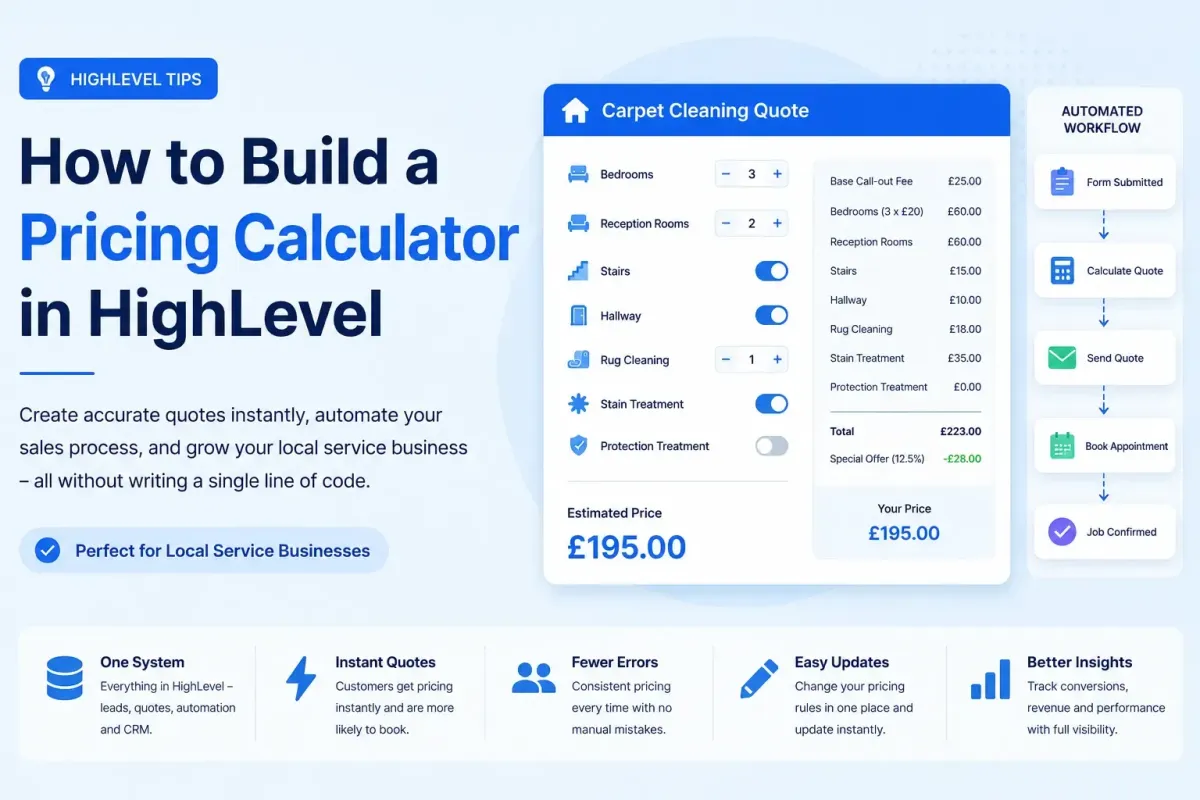
Build a Powerful Pricing Calculator in HighLevel (Without Custom Code)
Over the past eighteen months, HighLevel has undergone a fundamental paradigm shift. It has transitioned from being a world-class marketing automation and CRM platform into a fully-fledged, no-code application-building environment.
The catalyst for this evolution isn’t just one feature, but a powerful triad of functionalities: Number Fields, Currency Fields, and Math Actions.
Together, these three tools allow you to build sophisticated, dynamic pricing calculators entirely inside HighLevel. You no longer need to rely on clunky external spreadsheets, brittle Zapier webhooks passing data to Google Sheets, expensive bespoke web applications, or custom JavaScript injected into landing pages.
Whether you run a carpet cleaning franchise, a plumbing network, a commercial pressure washing operation, or a high-end landscaping company, HighLevel can now calculate precise quotes, store every single line-item inside the contact record, and trigger a highly personalised customer journey—all in real-time.
In this comprehensive guide, we are going to break down exactly how to architect a professional, enterprise-grade pricing calculator. We will use a carpet cleaning business as our primary use case, but the underlying architectural principles, data structures, and logical frameworks apply to almost any service-based business on the planet.

The Business Impact: Why This Drives Revenue, Not Just Automation
It’s easy to look at a workflow built with Number Fields, Currency Fields, and Math Actions and simply see a cool piece of technical engineering. But beneath the surface of the CRM, this architecture fundamentally transforms the financial trajectory of a service-based business.
Building a native pricing engine isn’t just about saving your sales team a few minutes of data entry. It is a strategic revenue driver. Here is how this system directly impacts your company’s bottom line.
1. Obliterating the Speed-to-Lead Gap
In the home services industry, speed-to-lead is the single most important metric for closing deals. When a homeowner has a flooded basement, a stained sofa, or a broken boiler, they don't fill out one form—they fill out three.
In a legacy system, that form submission sits in a queue, waiting for a sales rep to manually calculate a price using a spreadsheet or a mental matrix. By the time the quote is sent, the customer has already booked your competitor.
A HighLevel pricing engine operates at the speed of light. The moment the customer clicks "Submit," the Math Actions fire, the Currency Fields populate, and the Workflow triggers an SMS or email with a perfectly formatted, accurate Final: Grand Total. You are quite literally reaching the customer while they are still looking at their screen. This instantaneous response positions your brand as highly professional, efficient, and instantly trustworthy.
2. Ironclad Margin Protection and Pricing Consistency
When pricing relies on human calculation—whether it’s an owner or a junior sales rep—inconsistencies are inevitable. A rep might forget to add the £25 call-out fee. An owner might give a "mates rates" discount on the fly and forget to document why. Sometimes, under pressure, staff will simply guess a price to get the deal over the line.
This creates massive margin leakage. You might think you are charging £30 per room, but across a hundred jobs, your actual realised revenue might be £24 per room due to unrecorded omissions and manual errors.
A math-driven workflow has no feelings, no bad days, and no memory lapses. It applies your exact business rules ruthlessly and consistently to every single lead. If stain removal is £35, it is added £35 every single time. By forcing your pricing logic through Currency Fields and Math Actions, you plug the leaks in your revenue bucket and guarantee your profit margins are protected on every single job.
3. Granular Financial Reporting and Business Intelligence
As mentioned earlier, storing intermediate Currency Fields (like Calc: Room Total and Calc: Extras Total) turns your CRM into a goldmine of business intelligence.
Standard CRMs only tell you if a deal was closed and the final amount. A HighLevel pricing engine tells you how that deal was constructed. By running reports on your Currency Fields, you can uncover vital strategic insights:
Product Mix Analysis: You might discover that while carpet cleaning is your core offering, the
Calc: Extras Totalreveals that fabric protection actually generates 35% of your gross profit. You can then pivot your marketing to actively push fabric protection.Pricing Elasticity: If you increase the price of staircases from £15 to £18, you can track the conversion rate of the
Final: Grand Totalto see if the price increase caused a drop in bookings.Average Job Value (AJV) by Region: By combining your Number Field inputs (e.g., bedrooms) with your Currency Field outputs, you can see the exact average value of a 3-bedroom house in Postcode A versus Postcode B, allowing for hyper-targeted ad spend.
You cannot optimise what you do not measure. Granular Currency Fields give you the microscope you need to optimise your pricing strategy.
4. Frictionless Scaling and Franchise-Ready Systems
If you are a single operator, you can get away with "knowing" your prices in your head. But the moment you hire a second dispatcher, open a second location, or attempt to franchise your business, that implicit knowledge becomes a massive bottleneck.
You cannot easily teach a new employee a complex matrix of: "Well, it's £20 a room, but if it's over 5 rooms we drop it to £18, and if they are outside the M25 we add £10, unless it's a Tuesday..."
A workflow-based pricing engine completely removes this bottleneck. It effectively "downloads" the owner's brain into the CRM. A brand new, unskilled sales rep can join the company, look at the Final: Grand Total Currency Field on the contact record, and confidently sell the job, knowing the math has been executed flawlessly by the system. Your pricing becomes a scalable, franchise-ready asset, rather than a tribal knowledge bottleneck.
5. Deflecting Customer Service Friction via AI Transparency
A massive hidden cost in service businesses is the time spent on the phone answering basic administrative questions: "Why is it this much?" "What did I actually order?" "If I remove the rugs, what is the new price?"
Traditionally, a human has to pull up the file, do mental math, and explain the breakdown.
Because your pricing engine utilises intermediate Currency Fields, you can feed these variables directly into an AI Employee or conversational AI bot. When a customer texts in questioning the price, the AI doesn't need to fetch a human. It simply reads the Calc: Base Fee, Calc: Room Total, and Calc: Extras Total Currency Fields and instantly replies:
"Hi Sarah, your quote of £200.00 breaks down as follows: £25 call-out fee, £110 for your 4 rooms, £35 for the stain treatment on the lounge, and £30 VAT. If you'd like to remove the stain treatment, I can instantly update your invoice to £165.00. Shall I proceed?"
This level of instantaneous, transparent self-service delights the customer while eliminating the administrative burden on your frontline staff.
Ultimately, transitioning from manual quoting to a native HighLevel pricing engine shifts your business from a reactive, person-dependent operation into a proactive, system-dependent machine. It captures more leads, closes them faster, protects your margins, and gives you the data clarity to grow profitably.

The Hidden Costs of Legacy Quoting Systems
To truly appreciate the value of building an internal pricing engine, we first have to look at why traditional methods fail local service businesses.
Historically, quoting lives outside the CRM. When a lead comes in, businesses typically resort to one of several manual or disjointed methods:
1. The Excel/Google Sheets Nightmare: A business owner creates a complex spreadsheet with hidden cells and nested IF statements. They manually transfer data from the HighLevel form into the spreadsheet, calculate the price, and then manually type that price into an email or SMS. This introduces human error, destroys speed-to-lead, and creates a data silo where the financial breakdown lives outside the customer's CRM profile.
2. Bespoke Web Applications: Some businesses pay developers thousands of pounds to build a "quote builder" on their WordPress site. While these look nice, they are incredibly rigid. If you want to change a price, add a new service, or modify the follow-up sequence, you have to pay a developer. Worse, getting that calculated data back into HighLevel seamlessly is a technical nightmare.
3. Mental Arithmetic & "Ballparking": Perhaps the most common method for small service businesses. A customer calls, the owner guesses a price based on experience, and sends a text. This leads to inconsistent pricing, margin erosion, and an inability to scale because the pricing logic lives entirely inside the owner's head.
The HighLevel Solution:
Building the calculator directly inside HighLevel means the ecosystem operates as a single, unified machine. The customer submits a structured form; HighLevel processes the data via Math Actions; the final price is stored in a dedicated Currency Field against the contact; workflows trigger instantly based on the quote value; and the AI Agent has absolute clarity on the monetary data to answer specific billing queries.
You stop passing data between systems. HighLevel becomes the absolute, undeniable source of truth for your pricing.
The Crucial Distinction: Number Fields vs. Currency Fields
To build a robust, enterprise-grade calculator, you must understand the distinct differences between variable types. Treating them the same is the single most common mistake users make when building HighLevel workflows, and it causes a cascade of problems down the line.
Think of your calculator like a physical cash register. You have the buttons you press to count items (Number Fields), and the digital screen that shows the money (Currency Fields).
Number Fields are your Quantities
Number Fields are designed to count raw, whole inputs. They represent how many of something exists.
How many bedrooms? (3)
How many staircases? (1)
Square footage of the property? (1200)
Number of rugs? (2)
HighLevel understands that these are integers or decimals to be used in mathematical equations. They should never have currency symbols attached to them.
Currency Fields are your Monetary Results
Currency Fields are a specialised data type introduced specifically to handle financial outputs. They store the actual money values.
Subtotal: (£145.00)
Tax Amount: (£29.00)
Grand Total: (£174.00)
Why This Distinction Matters So Much
If you try to use a standard Number Field to store a final price of "145", you will run into severe issues:
Formatting Nightmares: A Number Field will display as
145. It will not automatically add the £ symbol, and it will not enforce the two decimal places required for financial transactions. Sending a quote via SMS that says "Your total is 145" looks unprofessional and creates friction.AI Context Collapse: HighLevel's AI Conversational agent is highly intelligent, but it relies on context clues. If the AI sees a field named "Total" with a value of "145", it might not confidently understand that this is British Pounds, US Dollars, or a quantity of items. When it sees a Currency Field named "Total" with a value of "£145.00", the AI immediately understands this is financial data and will converse about it accurately.
Invoice Integration: HighLevel's native invoicing and payment collection features are designed to map directly to Currency Fields. Trying to push a standard Number Field into a payment gateway can cause rounding errors or failed transactions.
The Golden Rule: When you multiply a Number Field (quantity) by a static rate (price per room), you must always store the resulting output in a Currency Field. This separation ensures your workflow is clean, your reports are accurate, and your customers never see a misformatted number.

Pre-Flight Check: Designing Your Data Schema
Before you even open the Workflow builder, you must design your custom field architecture. A common mistake is to build the workflow on the fly, creating fields randomly as you go. This leads to a messy CRM that is impossible for your team to navigate.
Open your HighLevel Custom Fields manager and group your fields logically using the "Field Groups" feature.
Group 1: Quote Inputs (Number Fields)
Input: BedroomsInput: Reception RoomsInput: StaircasesInput: Rugs
Group 2: Quote Add-ons (Checkbox or Dropdown Fields)
Input: Stain Removal(Options: Yes / No)Input: Fabric Protection(Options: Yes / No)
Group 3: Quote State (Dropdown Field)
Quote Stage(Options: Pending, Calculating, Calculated, Manual Review Required, Accepted, Rejected)Note: We will use this field later to prevent our math from running twice.
Group 4: Intermediate Calculations (Currency Fields)
Calc: Base Call-Out FeeCalc: Room TotalCalc: Extras TotalCalc: Tax Amount
Group 5: Final Outputs (Currency Fields)
Final: Grand TotalFinal: Deposit Required
Using this naming convention (Input, Calc, Final) ensures that when your sales team looks at a contact record, they know exactly what they are looking at. They won't be confused by seeing a "Room Total" mixed in with the customer's phone number and email address. Everything is neatly categorised.
The Blueprint: Building the Math Workflow
Now we enter the Workflow builder. Modern HighLevel Math Actions allow you to perform sequential calculations. Instead of trying to write one massive, complex algebraic formula, we build the total step-by-step. We act like a calculator, hitting the equals sign at various intervals to store our progress.
Let's assume our carpet cleaning pricing structure looks like this:
Call-out fee: £25
Bedroom: £20 each
Reception room: £30 each
Staircase: £15
Rug: £18 each
Stain treatment: £35 (Flat fee)
Fabric protection: £25 (Flat fee)
Tax (VAT): 20%
Here is exactly how you construct the workflow:
Step 1: The Safety Check (Idempotency)
Trigger: Form Submitted.
Action: Condition Node. Check if Quote Stage equals "Calculated".
Logic: If YES, end the workflow. If NO, proceed to the next step.
(Why? If a contact accidentally double-submits the form, or if the workflow is triggered twice by an API glitch, this prevents HighLevel from adding the £25 call-out fee twice, saving you from a massively underquoted job).
Step 2: Update State
Action: Update Contact Field. Set Quote Stage to "Calculating".
Step 3: The Base Price
Action: Math Action.
Operation: Set Variable.
Set: Calc: Base Call-Out Fee (Currency Field) = 25.
Step 4: Calculate Room Totals
Here we multiply our Number Fields by static rates, adding the results directly into a Currency Field.
Action: Math Action.
Operation: Multiply.
Multiply: Input: Bedrooms by 20.
Then: Add result to Calc: Room Total.
Action: Math Action.
Operation: Multiply.
Multiply: Input: Reception Rooms by 30.
Then: Add result to Calc: Room Total.
Action: Math Action.
Operation: Multiply.
Multiply: Input: Staircases by 15.
Then: Add result to Calc: Room Total.
Step 5: Calculate Rug Totals
Action: Math Action.
Operation: Multiply.
Multiply: Input: Rugs by 18.
Then: Add result to Calc: Room Total.
(At this point, if a customer selected 2 bedrooms, 1 reception, and 1 rug, the Calc: Room Total Currency Field should now accurately read £88.00).
Step 6: Handling Optional Extras
Now we use conditional paths based on the checkbox inputs from the form.
Action: Condition Node. Does Input: Stain Removal equal "Yes"?
If YES:
Action: Math Action.
Operation: Add.
Add: 35 to Calc: Extras Total.
Action: Condition Node. Does Input: Fabric Protection equal "Yes"?
If YES:
Action: Math Action.
Operation: Add.
Add: 25 to Calc: Extras Total.
Step 7: Calculate Tax
Before we get the final number, we need to calculate the tax on the combined total of the base fee, rooms, and extras.
Action: Math Action.
Operation: Custom Math.
Formula: (Calc: Base Call-Out Fee + Calc: Room Total + Calc: Extras Total) * 0.20
Store Result In: Calc: Tax Amount (Currency Field).
Step 8: The Grand Total
Action: Math Action.
Operation: Custom Math.
Formula: Calc: Base Call-Out Fee + Calc: Room Total + Calc: Extras Total + Calc: Tax Amount
Store Result In: Final: Grand Total (Currency Field).
Step 9: Update Final State & Trigger Next Workflow
Action: Update Contact Field. Set Quote Stage to "Calculated".
Action: Trigger Another Workflow. (We will discuss why in the next section).

The "Software Engineer" Mindset: Advanced Workflow Mechanics
If you want to move beyond basic automations, you have to adopt the mindset of a software developer. Developers don't just write code; they architect systems. Here are two critical software engineering concepts you must apply to your HighLevel pricing engine.
1. Separation of Concerns (Modular Architecture)
In software engineering, "Separation of Concerns" means that a program should be divided into distinct sections, each addressing a separate concern.
Your pricing calculator workflow should have one responsibility: crunching numbers. It should not contain email sending nodes, SMS nodes, or calendar booking nodes.
Why? Because business logic (pricing) changes much less frequently than marketing logic (copywriting). If you mix them, every time you want to tweak the wording of your quote email, you have to open a massive, complex workflow filled with Math Actions, risking accidentally breaking a calculation node.
Instead, at the end of your Math Workflow (Step 9 above), use the "Trigger Workflow" action to fire off a separate workflow called "Quote Communication Workflow." That second workflow is solely responsible for checking the Final: Grand Total Currency Field and sending the appropriate emails and texts.
2. State Management (Idempotency)
We touched on this in Step 1, but it's worth expanding. In software, an "idempotent" operation can be applied multiple times without changing the result beyond the initial application.
If you run a math action that says "Add 25 to Grand Total," that action is not idempotent. If it runs once, it adds 25. If it runs twice, it adds 50.
Because HighLevel workflows can sometimes be triggered by system glitches, webhook retries, or user errors (clicking submit twice), you must manage the state of the quote. By using the Quote Stage In a dropdown field as a "gatekeeper," you ensure that once the math is done, it can never be accidentally run again for that specific contact.
The Power of Intermediate Currency Fields
Most amateur builders only save the final Grand Total. That is a massive missed opportunity that robs your business of vital intelligence.
By storing every stage of the calculation in separate Currency Fields (Calc: Base Fee, Calc: Room Total, Calc: Extras Total), You turn your CRM into a business intelligence dashboard.
1. Transparency for Sales Staff:
If a customer calls in complaining that their quote of £240 is too high, your sales team can look at the contact record and see exactly how that number was built. They can see: "Ah, the base fee was £25, rooms were £110, but the Extras Total is £105 because they selected both stain removal and fabric protection." Your team is instantly armed with the context needed to negotiate or explain the value.
2. AI Context and Conversation:
This is where Currency Fields absolutely shine. If you only have a field called "Grand Total," and a customer asks the AI Agent, "Why is it so expensive?", the AI has to guess. It might hallucinate an answer.
But because you used Currency Fields to break down the math, you can feed those specific fields to the AI. The AI can literally read the Calc: Extras Total field and respond: "Your quote includes £60 in optional extras—specifically the stain removal and fabric protection you requested. Would you like me to generate a revised quote without those services?"
3. Revenue and Margin Reporting:
By having intermediate Currency Fields, you can run advanced reports in HighLevel. You can look at a pipeline view and see an aggregate total of just the Calc: Extras Total across all closed-won deals this month. You might discover that while rooms generate the base revenue, your fabric protection upsell is actually generating 40% of your net profit. You can't make data-driven business decisions if you don't capture the data at a granular level.
The Smart Exit: Edge Cases and Human Handoff
Not every inquiry should receive an instant, automated price. One of the hallmarks of bad automation is forcing a square peg into a round hole, resulting in a wildly inaccurate quote that either loses you the job or eats your margins.
Good automation understands the boundaries of its algorithm and knows exactly when to trigger human intervention. You must build "Smart Exits" into your calculator logic using conditional paths before the Math Actions begin.
Here are common edge cases you should account for:
1. Geographic Boundaries:
Logic: If Input: Postcode is NOT IN [List of serviceable postcodes]...
Action: Skip all math. Set Quote Stage to "Manual Review Required". Create a Task for the owner: "Out-of-area lead requires travel surcharge calculation." Send an SMS to the customer: "Thanks for your inquiry! Your postcode is slightly outside our standard route, but we'd love to help. A specialist is reviewing the logistics and will get back to you shortly."
2. Commercial vs. Residential:
Logic: If Input: Property Type equals "Commercial"...
Action: Skip math. Commercial carpet cleaning often involves different chemicals, different equipment, and square-footage-based pricing rather than room-based pricing. Route this directly to a human estimator.
3. Maximum Thresholds:
Logic: If Input: Bedrooms is greater than 8...
Action: Flag for manual review. A property with 8+ bedrooms is likely a mansion or a commercial premises. The standard £20/room rate might not be profitable for the time required.
Forcing an inaccurate algorithmic quote destroys trust. Triggering a polished, professional human handoff builds immense trust and positions your company as thorough and detail-oriented.
AI Integration: The Translator, Not the Calculator
There is a temptation in the AI era to simply tell an AI bot: "Here are our prices, calculate a quote for the customer." Do not do this.
Large Language Models (LLMs) are brilliant at language, nuance, and context. They are improving with structured and numerical data to provide precise, deterministic mathematics. If you ask an AI to multiply 4 rooms by £30, there is a small but real chance it will confidently tell the customer the price is £1200.
Pricing should remain deterministic (Math Actions). Conversation should remain intelligent (AI).
Because you have built an underlying engine that outputs pre-calculated Currency Fields, the AI’s job becomes incredibly easy and foolproof. It doesn't need to do math; it just needs to read the database.
You can configure your AI Agent's custom knowledge base or system prompts to leverage your structured Currency Fields for scenarios like:
Objection Handling:
Customer: "That's too expensive, I only have a small house."
AI readsCalc: Room TotalandCalc: Base Fee: "I understand, Bob. The quote is actually largely made up of our standard £25 call-out fee and the staircases, which require specialised equipment. The room cleaning itself is only £60. Would you like to proceed?"Dynamic Upselling:
Customer: "How much more to add fabric protection?"
AI: "I can add our premium fabric protection, which protects against future stains, for exactly £25.00. Shall I update yourFinal: Grand Totalaccount and send you the revised invoice?" *(Note: You can even give the AI a specific workflow trigger to add the £25 to the Currency Field and recalculate!).
By separating the calculation from the conversation, you get the absolute best of both worlds: flawless mathematical accuracy combined with empathetic, highly contextual sales conversations.
Future-Proofing Your Business Architecture
In business, the only constant is change. Inevitably, your costs will rise. Fuel prices fluctuate, the minimum wage increases, the cost of cleaning chemicals goes up, or you decide to launch a premium "Deep Clean" tier.
If your pricing logic is hardcoded into email templates, buried in PDF brochures, or locked in an external developer's codebase, updating your prices is a painful, expensive project.
When you build your engine using structured Number Fields, Currency Fields, and Math Actions, updating your pricing across your entire business is a two-minute job:
Open your Pricing Calculator Workflow in HighLevel.
Locate the Math Action for Bedrooms.
Change the static multiplier from 20 to 22.
Click Save.
That’s it.
Because your email templates, SMS messages, AI agent prompts, and invoice generators all dynamically pull from the Final: Grand Total Currency Field: Every single new lead that comes through the system immediately sees the updated £22/room pricing. You do not have to hunt through dozens of templates. You do not have to update your website. The CRM is the single source of truth, and updating the truth updates the entire business output instantly.
Conclusion: HighLevel as Your Financial Nervous System
HighLevel has evolved far beyond its origins as an email marketing and funnel-building tool. With the introduction of Math Actions, Number Fields, and specifically, Currency Fields, it has crossed the threshold into becoming a bona fide Business Operating System.
By applying the principles outlined in this guide—designing strict data schemas, respecting the difference between quantities and money, building idempotent workflows, separating your calculation logic from your communication logic, and empowering AI to explain rather than calculate—you are no longer just building a Data to Dollars: Building a Dynamic Pricing Engine in "funnel."
You are building a dynamic, scalable, intelligent pricing engine. You are eliminating human error, protecting your profit margins, capturing deep business intelligence, and providing a lightning-fast, premium quoting experience to your customers.
When architected correctly, HighLevel doesn't just generate a quote. It becomes the central nervous system that calculates, stores, explains, and automates your entire sales process, seamlessly guiding every enquiry from their first click all the way to a paid, booked invoice.