
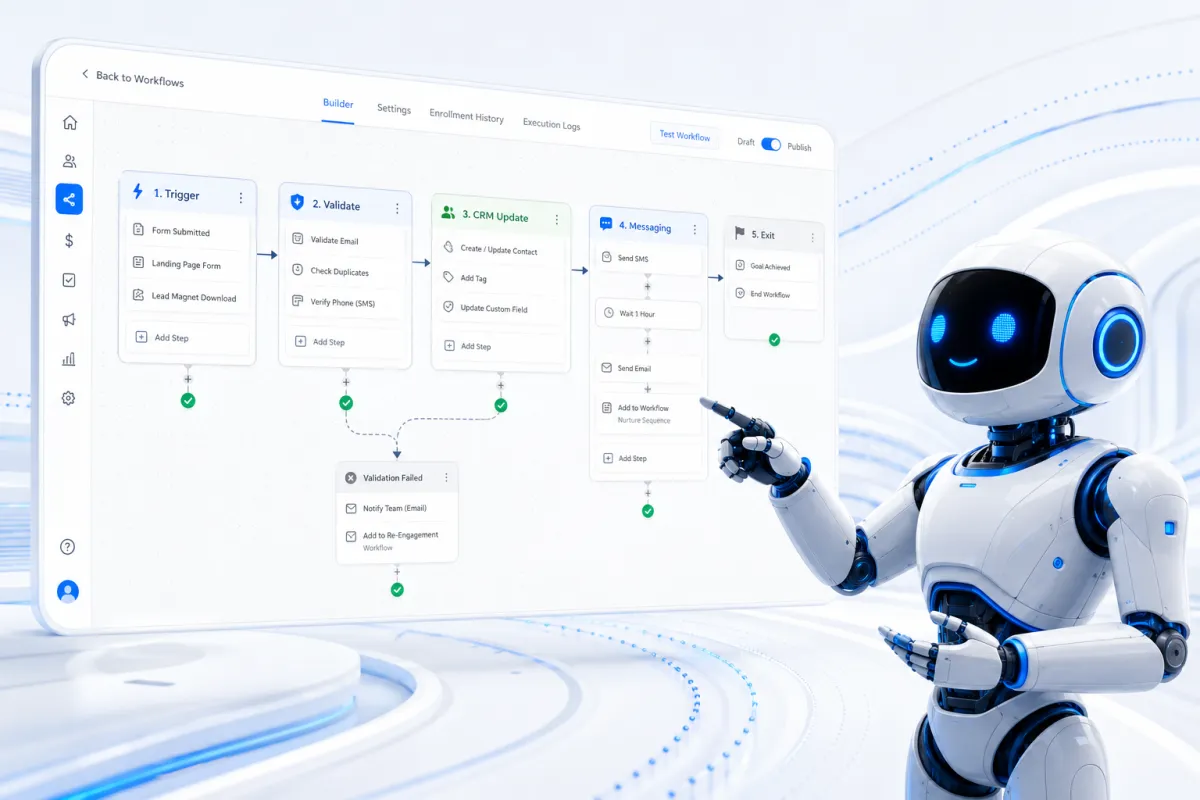
HighLevel Workflow Tips & Best Practices: How to Build Reliable Automations That Scale
HighLevel workflows can automate almost every stage of the customer journey, from capturing a new enquiry and assigning it to a salesperson to sending appointment reminders, updating opportunities, collecting payments and requesting reviews.
However, being able to automate almost everything does not mean that everything should be placed inside one enormous workflow.
The most effective HighLevel automation systems are modular, data-led and easy to diagnose. Each workflow has a clear purpose, every important decision is based on reliable CRM data, and contacts can exit an automation as soon as their circumstances change.
This guide explains how to design, test and maintain HighLevel workflows that remain reliable as a business grows.
What is a HighLevel workflow?
A HighLevel workflow is a sequence of automated actions initiated by a trigger. A trigger might be a form submission, an appointment status change, a customer reply, an opportunity moving stage or a payment being received.
After the trigger fires, the workflow can perform actions such as:
Updating contact, company or opportunity fields
Adding or removing tags
Assigning a contact to a user
Creating or updating an opportunity
Sending email, SMS or WhatsApp messages
Creating tasks and internal notifications
Waiting until a specified time or event
Branching according to If/Else conditions
Adding the contact to another workflow
Sending data to another system
HighLevel describes workflows as event-driven sequences of triggers and actions. The platform now includes a large range of native actions, conditional logic, Goal Events and detailed execution logs. This makes HighLevel capable of supporting far more than basic lead-nurture campaigns.

The challenge is therefore not whether something can be automated. The challenge is designing the automation so it remains accurate, understandable and commercially useful.
1. Give every workflow one clear purpose
A workflow should have a specific responsibility that can be described in one sentence.
Good examples include:
Store first-touch and latest-touch attribution
Create and assign a new sales opportunity
Send a new-lead response sequence
Manage appointment reminders
Move a qualified opportunity into onboarding
Request a review after service completion
If the description contains several unrelated outcomes, the workflow is probably doing too much.
For example, a single workflow should not normally capture attribution, calculate a quote, send a ten-message sales sequence, manage appointment reminders, update every pipeline stage and onboard the resulting customer. That design may work initially, but it becomes difficult to test and risky to edit.
A better approach is to build several connected workflows, with each one responsible for a defined business process.
2. Use modular workflows instead of one large automation
Modular workflows are easier to understand, reuse and troubleshoot. One workflow can complete its task and then enrol the contact in the next appropriate workflow.
A new website enquiry might use the following structure:
Lead capture workflow: validates the record and stores attribution.
CRM workflow: assigns the owner and creates or updates the opportunity.
Customer communication workflow: sends the immediate response and follow-up sequence.
Internal notification workflow: alerts the assigned salesperson and creates a task.
Appointment workflow: takes over when the lead books.
This approach also reduces the risk that a customer reply stops an important operational action. The communication sequence can stop when the contact responds, while attribution storage and CRM updates continue independently.
3. Separate CRM operations from customer communications
This is one of the most valuable architectural improvements a business can make.
Operational actions include:
Updating fields
Creating opportunities
Moving pipeline stages
Assigning owners
Recording attribution
Creating tasks
Sending data to another system
Communication actions include:
Sending emails
Sending SMS messages
Sending WhatsApp templates
Leaving voicemail drops
Starting nurture sequences
These actions have different exit rules. A reply should normally stop an automated sales follow-up, but it should not prevent HighLevel from recording a lead source, creating a task or updating an opportunity.
Keeping the two categories separate makes settings such as Stop on Response safer and more predictable.
4. Use a consistent workflow naming convention
As the number of workflows increases, naming becomes operationally important. Names such as “New Workflow 12” or “Lead Automation Copy” provide no useful information.
A practical naming structure is:
Department | Process | Trigger | Version
Examples include:
001-001 - Sales | New Lead Follow-Up | Form Submitted | V2002-001 - CRM | Create Opportunity | Qualified Lead | V1003-001 - Service | Appointment Reminders | Appointment Booked | V3004-001 - Reporting | Store Attribution | Contact Created | V2
Important triggers, branches and actions should also be named. This makes the workflow canvas and execution logs considerably easier to interpret.
5. Use the most precise trigger available
HighLevel offers many triggers, but a broad trigger can enrol contacts that were never intended to enter the workflow.
For example, Contact Created may include contacts created through forms, imports, integrations, telephone calls and manual entry. If the process is specifically for website quote requests, Form Submitted with the correct form filter is safer.
Apply filters at the trigger whenever possible. Depending on the trigger, useful filters may include:
Form or survey
Calendar
Pipeline and pipeline stage
Appointment status
Tag
Lead source
Product
Campaign or page
Custom-field value
Precise trigger filters reduce unnecessary workflow executions and remove the need for complicated filtering later.
6. Decide deliberately whether contacts can re-enter
Workflow re-entry should reflect the underlying business event.
Re-entry often makes sense for:
Repeat enquiries
New appointments
Recurring service visits
Additional purchases
Separate opportunities
It is usually inappropriate for:
Initial customer onboarding
Recording first-touch attribution
One-time account setup
Welcome sequences intended for new contacts only
Do not enable re-entry merely because a contact might need the workflow again. Consider what will happen to existing tasks, messages, tags and opportunities when the same person enters twice.
7. Treat fields as the source of truth
Custom fields should store facts about a contact or commercial process. Examples include:
Service required
Lead source
Qualification status
Quote value
Appointment date
Customer type
Contract status
First UTM source
Latest UTM source
Google Click ID
External customer or mandate ID
Fields provide structured values that can be displayed on records, filtered, synchronised and used in reporting.
Tags are better suited to temporary categories and automation controls, such as:
Follow-Up ActiveManual Review RequiredAttribution StoredQuote Calculation FailedDo Not Automate
A CRM becomes difficult to manage when dozens of tags are used to represent information that should have been stored in controlled fields.
The useful rule is simple: fields describe reality; tags help control automation.
8. Standardise field values
Workflow logic depends on exact values. Small inconsistencies can send contacts down the wrong branch.
For example, these may appear similar to a person but can be treated as different values by an automation:
Semi-detachedSemi Detachedsemi-detachedSemi–detached
Use dropdowns, radio buttons or controlled options wherever possible. Create one standard value for each outcome and use it consistently across forms, integrations, calculations and workflow conditions.
9. Validate required data at the beginning
Before a workflow sends messages, creates opportunities or performs calculations, check that the required information exists.
A quote-calculation workflow might confirm that it has received:
Service type
Property type
Number of bedrooms
Frequency
Postcode or service area
If something is missing, the contact should follow an exception path. That path might apply an error tag, notify an administrator, create a task or request the missing information.
Silently continuing with incomplete data can generate incorrect quotes, blank messages and misleading pipeline records.
10. Preserve first-touch and latest-touch attribution
HighLevel has system attribution values that can be used in reporting and workflows. It is often helpful to copy important values into visible custom fields on the contact record.
These may include:
UTM source
UTM medium
Campaign
Landing URL
GCLID
First-touch source
Latest-touch source
First-touch fields should normally be populated only when empty. Latest-touch fields can be updated after a new attributable interaction.
This creates a durable attribution record that can be viewed on the contact index, copied to an opportunity or company, and used for offline conversion tracking.
11. Design every If/Else branch, including the fallback
If/Else actions allow a workflow to respond to contact data, appointments, tags and outputs from earlier actions. They are essential for qualification, personalisation and exception handling.
However, every If/Else action should include a deliberate fallback path.
Suppose a workflow branches according to property type:
Detached
Semi-detached
Terraced
Flat
What happens if the field is blank, contains an old option or arrives with an unexpected value? The None branch should not be ignored. It should send the contact to manual review or another safe outcome.
HighLevel supports multiple branches, dynamic values and a fallback route in its If/Else workflow action.
12. Avoid excessive nested logic
Branching is useful, but deeply nested branches are difficult to follow. If a workflow contains several levels of If/Else logic, consider moving a section into another workflow.
For example, instead of placing every service-specific quotation rule inside the new-lead workflow, route each eligible service into its own calculation workflow.
The result is a clearer main process and smaller components that can be tested independently.
13. Use the correct type of wait
A wait step should represent what the business is actually waiting for.
There is a significant difference between:
Wait for two days
Wait until Monday at 09:00
Wait until the contact replies
Wait until an appointment is booked
Wait until a field changes
Fixed delays are appropriate when elapsed time matters. Event-based waits are better when the next action depends on customer behaviour.
HighLevel provides several wait options for timing, dates and conditions. Its Wait action documentation explains the available configurations.
14. Recheck conditions after a long wait
A contact's circumstances can change while they are waiting. They may reply, book an appointment, make a payment or be manually marked as disqualified.
Before sending the next message, check the current state again.
A typical follow-up pattern is:
Send the initial response.
Wait for a defined period.
Check whether the contact replied, booked or changed status.
Continue only if follow-up is still required.
This prevents outdated or embarrassing messages, such as asking someone to book after they have already scheduled an appointment.
15. Use communication windows and time zones
The workflow timezone, account timezone and contact timezone can affect when an action is executed.
Use communication windows to prevent non-urgent SMS, WhatsApp messages or automated calls from being sent late at night. Also consider weekends and bank holidays, particularly for internal tasks that require a team member to respond.
An immediate confirmation may be appropriate outside business hours, but a sales follow-up or call reminder may need to wait until the next working period.
16. Use Stop on Response selectively
Stop on Response is useful for sales nurture sequences because it prevents automated follow-ups from continuing after the contact replies.
It should not be applied indiscriminately.
If a workflow also contains operational actions, a reply could stop required steps. This is another reason to separate communication workflows from CRM management workflows.
Also remember that not every reply is positive. A response may be an unsubscribe request, an automatic email reply, a complaint or a wrong-number notification. Where necessary, use reply-based workflows and conditions to categorise the response and determine the correct next action.
17. Prevent competing communication workflows
A contact should not receive several unrelated nurture sequences simultaneously.
Create clear removal rules for events such as:
Customer replied
Appointment booked
Quote accepted
Payment received
Opportunity won or lost
Contact manually disqualified
Contact requested no further marketing
Control fields, tags and workflow removal actions can be used to prevent overlap. The design should make it clear which sequence currently owns the follow-up.
18. Create and update opportunities carefully
Before creating an opportunity, determine whether a matching opportunity already exists. Repeat form submissions or workflow re-entry can otherwise create duplicate deals.
The workflow should know:
Which pipeline to use
Which opportunity to update
Whether multiple opportunities are permitted
Who owns the opportunity
Which event justifies a stage change
What monetary value should be recorded
Avoid moving an opportunity merely because an email or quotation was sent. Important stages should represent genuine commercial events such as qualification, appointment booking, quote acceptance, deposit payment or service completion.
Past-tense stage names such as Quote Sent, Appointment Booked and Deposit Paid help make this distinction clear.
19. Avoid uncontrolled two-way synchronisation
It is sometimes useful to synchronise a contact status with an opportunity stage, but two-way updates can create automation loops.
For example:
A contact field changes.
Workflow A updates the opportunity stage.
The stage change triggers Workflow B.
Workflow B updates the original contact field.
Workflow A starts again.
Choose one source of truth and use one-way synchronisation unless there is a documented reason for both directions. Add control conditions so that workflows do not rewrite values unnecessarily.
20. Prefer native HighLevel actions first
HighLevel now offers native actions for a wide range of CRM, appointment, payment, communication and integration processes.
Use native functionality where it meets the requirement reliably. Add webhooks, Make, Zapier or custom code only when the native route cannot complete the required process.
External automation creates additional points of failure, including authentication, field mapping, usage limits and duplicate records. Custom Code is also a premium workflow action and introduces code that someone must maintain. HighLevel documents its capabilities and limitations in the Custom Code workflow guide.
21. Make external integrations safe to retry
An integration action may run more than once because of retries, duplicate triggers or manual testing. It should not create duplicate customers, mandates, subscriptions or invoices.
Store the external platform's identifiers in dedicated fields, such as:
Customer ID
Mandate ID
Subscription ID
Billing Request ID
External Booking ID
Integration Status
Last Attempt Date
Error Message
Before creating a new record, check whether an identifier already exists. If it does, update or retrieve the existing record rather than creating another one.
22. Build an exception-handling process
Reliable automation does not assume that every action will succeed.
For important processes, define what happens when:
A required field is missing
A message cannot be delivered
An external system rejects a request
A webhook returns an error
No matching opportunity is found
An appointment has an unexpected status
A calculation produces no valid result
An exception path might update an error field, add a tag, notify the responsible user and create a task containing the contact and error details.
This turns a silent automation failure into a visible operational task.
23. Test with realistic contact records
Workflow testing should reflect real usage. A perfect test contact containing every possible field can hide problems that occur with genuine leads.
Test the workflow with:
A complete contact
A contact with missing fields
A duplicate contact or repeat submission
Each important branch outcome
An existing opportunity
No existing opportunity
A contact who replies during a wait
A contact who books during a follow-up sequence
An invalid or unexpected field value
Also test whether re-entry produces the intended result.
24. Use Enrollment History and Execution Logs
When a workflow behaves unexpectedly, do not diagnose it solely from the final contact record.
HighLevel's Enrollment History and Execution Logs show how a contact entered, which actions ran, which nodes were skipped and where errors occurred. HighLevel expanded these tools in 2026 to provide clearer workflow histories and error visibility. The official Execution Logs and Enrollment History guide explains the diagnostic views.
For each test, confirm:
The correct trigger fired
Trigger filters matched
The contact entered only once
The expected branch was selected
Fields changed to the correct values
The correct opportunity was created or updated
Messages used the expected personalisation
Connected systems received the correct data
HighLevel also allows individual workflow actions to be disabled while testing. Disabled nodes are shown as skipped in the execution logs, which makes controlled testing easier. See HighLevel's guide to pausing workflow actions.
25. Review workflows as the business changes
A workflow that was correct six months ago may no longer reflect the current sales process.
Review active workflows periodically and check:
Whether the trigger is still appropriate
Whether forms and calendars still exist
Whether field values have changed
Whether pipeline stages still reflect the sales process
Whether message templates remain accurate
Whether users and notification recipients are current
Whether integrations are still authenticated
Whether duplicated or obsolete workflows can be retired
Every important workflow should have a clear owner. That person does not need to build it, but they should understand the business outcome it controls.
A recommended HighLevel workflow structure
Although individual processes differ, the following sequence provides a reliable starting point:
Trigger: use the most precise business event available.
Eligibility check: confirm that the contact should enter.
Data validation: verify required fields and values.
Deduplication check: determine whether the process has already run.
CRM actions: update fields, assignment and opportunities.
Operational actions: create tasks, calculate values or call integrations.
Communication: send the appropriate customer message.
Wait or Goal Event: wait for time to pass or for a meaningful event.
Recheck: confirm that the contact still requires the next action.
Exit or handover: remove the contact, mark completion or add them to the next workflow.
This structure keeps the workflow aligned with how the business actually operates.
Common HighLevel workflow mistakes
The most frequent workflow problems are rarely caused by the builder itself. They usually result from unclear data ownership or ambiguous business logic.
Common mistakes include:
Building one workflow that manages the entire customer lifecycle
Using Contact Created instead of a precise event
Enabling re-entry without testing duplicate behaviour
Using tags instead of structured fields
Failing to handle blank or unexpected values
Allowing several follow-up sequences to run simultaneously
Using Stop on Response in an operational workflow
Updating the wrong opportunity
Creating loops between contact fields and pipeline stages
Using fixed delays when the process is waiting for an event
Adding external integrations when a native action would work
Testing only the successful path
Ignoring execution logs after an error
Removing these problems generally produces a larger improvement than adding more automation.
Final thoughts
HighLevel workflows are most valuable when they create a dependable operating system for the business—not simply a collection of automated messages.
The strongest workflow architecture follows four principles:
Fields store the source of truth.
Tags control temporary states and automation.
Workflows react to genuine business events.
Pipeline stages record completed commercial milestones.
When each workflow has one clear responsibility, every branch has a safe fallback and every important process can be traced through the execution logs, HighLevel becomes easier to manage and considerably more scalable.