
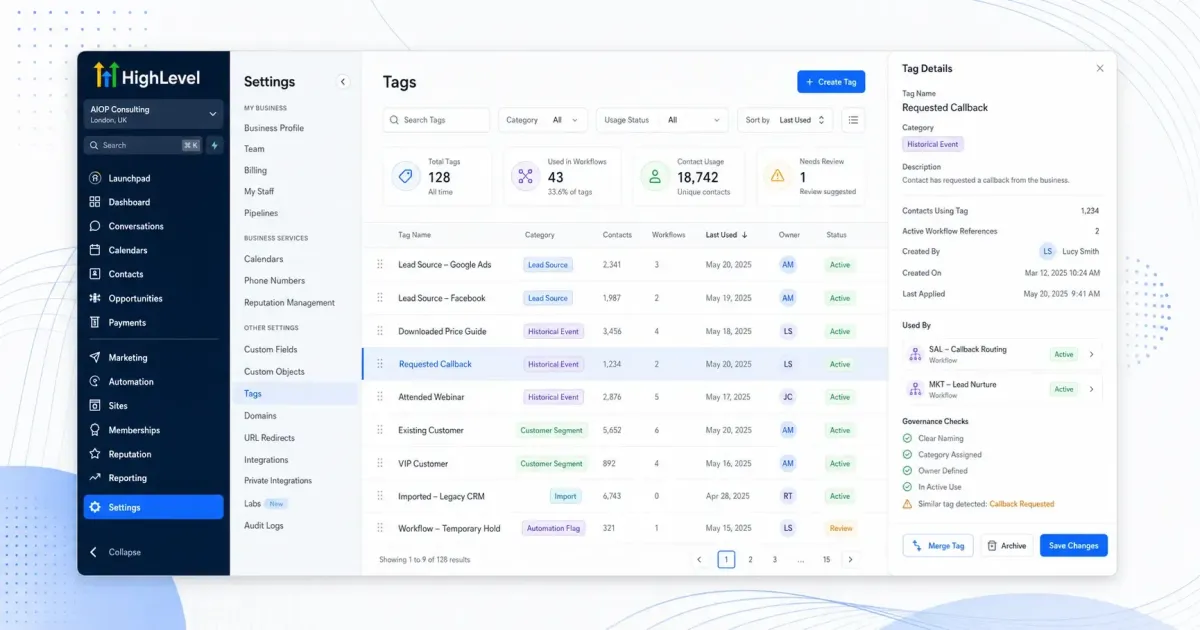
Master Tags in HighLevel: How & When to Use Them
Tags in HighLevel look deceptively simple: short labels you attach to contacts, opportunities or conversations. Yet for agencies, Tags are one of the most powerful levers for segmentation, automation and reporting. Used well, they allow you to:
Build precise audiences for campaigns without constantly exporting lists.
Trigger complex workflows based on behaviour, lifecycle stage or source.
Maintain clarity across multiple clients, offers and funnels at scale.
Used poorly, Tags quickly become an unmanageable mess: duplicated labels, inconsistent naming, “mystery” Tags no one remembers creating, and automations firing unpredictably. For agencies managing multiple accounts, that chaos multiplies fast. The following tips are designed specifically for businesses and agencies to keep HighLevel Tagging clean, strategic and scalable.
1. Start with a Clear Tagging Strategy, Not Random Labels
Before creating a single Tag, decide what you actually want Tags to do for you. For most agencies, Tags should support four core use cases:
Segmentation: Grouping contacts by attributes such as lead source, interest, location, or lifecycle stage.
Automation logic: Starting, pausing or routing workflows based on Tag presence or absence.
Reporting: Tracking campaign performance, lead quality or engagement by Tag groupings.
Operational clarity: Helping your team understand the status or history of a contact at a glance.
💡 Pro Tip: If you cannot explain in one sentence why a Tag exists and how it is used, you probably do not need it.
Document these use cases in a simple internal guide for your agency. This becomes your reference whenever someone suggests creating “just one more” Tag. Over time, this discipline prevents Tag sprawl and keeps your HighLevel accounts maintainable.
2. Design a Consistent Naming Convention for Tags
A robust naming convention is the difference between a Tag list you can search in seconds and a cluttered wall of noise. Agencies should standardise Tag names across all sub-accounts, with a structure that encodes meaning at a glance. A practical pattern is:
[CATEGORY] – [DETAIL] – [OPTIONAL CONTEXT]For example:
Source – Facebook Ads – Lead Gen Form
Stage – Nurture – Cold Lead
Interest – Service – Google Ads Management
Keeping the category at the beginning means Tags group together naturally when sorted alphabetically in HighLevel. This makes it far easier for your team to browse and avoid accidental duplication (for example, “FB Lead” versus “Facebook Lead”).
💡 Pro Tip: Create a short “Tag dictionary” in a shared document listing approved categories (e.g. Source, Stage, Interest, Campaign, Behaviour, Status) so everyone uses the same prefixes.
3. Separate Permanent Tags from Temporary or Automation-Only Tags
Not all Tags are equal. Some represent long-term attributes or history (such as “Purchased – Website Care Plan”), while others are purely functional and used briefly within workflows (for example, “Temp – Webinar Reminder Sent”). Mixing these types indiscriminately can make your Tag list hard to interpret and your reports misleading.
A useful approach for agencies is to classify Tags into three groups:
Profile Tags: Long-lived descriptors such as location, service interest, customer type or sector. These should rarely be removed.
Lifecycle Tags: Indicating where a contact is in the funnel (new lead, nurture, opportunity, customer, churned). These may change, but at any point in time, they should give a reliable snapshot of the status.
Automation Tags: Short-term markers used by workflows to control timing, prevent duplication, or track progress through a particular sequence.
For automation Tags, adopt a clear prefix such as “Auto – …” or “Temp – …”. This ensures your team immediately understands that these Tags are not for manual reporting or segmentation, and it makes periodic clean-up much easier.
4. Use Tags to Power Granular Segmentation (Without Overcomplicating It)
One of HighLevel’s strengths is the ability to filter contacts using multiple Tags at once. For agencies, this enables highly targeted campaigns such as “past webinar attendees who have not yet booked a strategy call” without building new lists from scratch each time.
To keep segmentation powerful but manageable:
Focus on Tags that you will genuinely use in campaigns or reports, not every conceivable attribute of a contact.
Combine Tags with other filters (such as last activity or pipeline stage) rather than trying to encode everything into the Tag itself.
Avoid creating separate Tags for things better handled by custom fields (for example, budget range or company size).
💡 Pro Tip: When planning a new campaign, design the required Tag conditions first. This ensures your existing Tag structure can support the segmentation you need, or highlights where to add new Tags deliberately.
5. Make Tags the Backbone of Your HighLevel Automations
For agencies, automations are where HighLevel delivers the most leverage. Tags are often the simplest and most reliable triggers for those workflows. Consider these common patterns you can use across multiple client accounts:
Entry triggers: When Tag “Lead – Downloaded Guide A” is added, start a specific nurture sequence tailored to that lead magnet.
Exclusion logic: If Tag “Status – Client” exists, skip promotional sequences meant only for prospects, avoiding awkward cross-selling.
Progress tracking: Apply Tags such as “Webinar – Registered”, “Webinar – Attended”, and “Webinar – No Show” to drive different follow-up paths automatically.
When you use Tags consistently across workflows, your automations become easier to audit and replicate. For example, you can copy a proven webinar funnel between client accounts, changing only the branding and content while keeping the same Tag logic intact.
💡 Pro Tip: Avoid using one-off conditions like “email equals X” when a Tag would do the job. Tags are more portable, easier to understand, and quicker to adjust later.
6. Align Tags with the Client’s Sales Process and Pipelines
HighLevel’s pipelines are excellent for visualising opportunities, but Tags can add another layer of insight that is particularly helpful when you are reporting back to clients. By mapping Tags to key sales milestones, you can quickly answer questions such as “How many leads reached proposal stage after the last campaign?” or “Which source produces the most sales-qualified leads?”.
Work with each client to define:
The key lifecycle stages that matter to their business (for example, Enquiry, Qualified, Proposal Sent, Won, Lost).
Which of those stages should have corresponding Tags that are updated automatically when an opportunity moves between pipeline stages?
This alignment ensures that even if someone looks at a contact outside the pipeline view (for example, in Conversations or Contacts), the Tags still tell the story of where that person is in the client’s buying journey.
7. Standardise Tag Usage Across All Client Accounts
Agencies rarely manage just one HighLevel account. Consistency across sub-accounts is crucial if you want your team to move between clients without constant re-learning, and if you plan to build repeatable systems and snapshots. To achieve this:
Create a master Tag framework that defines common categories and patterns you will use for all clients (for example, Source, Stage, Interest, Campaign, Behaviour, Status, Auto, Temp).
Use variations only where truly necessary (for example, industry-specific interests or offers).
Include Tag standards in your internal onboarding for new team members and in any documentation you share with white-label partners.
💡 Pro Tip: When you create HighLevel snapshots, ensure they include your standard Tag structure and workflows. This allows you to launch new client accounts with a consistent Tagging foundation from day one.
8. Use Tags Thoughtfully in Reporting and Client Communication
Tags are not only for internal organisation; they can also make your agency's reporting much more compelling. By structuring Tags carefully, you can present clear, data-backed answers to the questions clients care about:
Which sources (as defined by Source Tags) deliver the highest conversion rates to key lifecycle Tags like “Stage – Proposal Sent” or “Stage – Won”?
How do different campaigns perform when you compare contacts tagged with “Campaign – Q1 Promo” versus “Campaign – Evergreen Lead Magnet”.
Which behaviours (for example, “Behaviour – Opened 3+ Emails” or “Behaviour – Clicked Pricing Page”) correlate with higher revenue?
When presenting results, translate the Tag language into client-friendly wording. Rather than saying, “We added the ‘Behaviour – Warm Lead’ Tag to 120 contacts”, explain that “120 leads showed strong buying signals this month based on their engagement with your emails and pages”.
9. Train Your Team to Use Tags Consistently and Carefully
Even the best Tagging system will fail if your team does not understand or follow it. As an agency, you will often have account managers, salespeople, and support staff interacting with HighLevel, sometimes manually adding or removing Tags. To protect the integrity of your data:
Provide short, role-specific training on when and how to apply Tags manually (for example, adding “Status – VIP Client” after a certain threshold is reached).
Limit who can create new Tags, or at least require approval before new Tag categories are introduced, to avoid fragmentation.
Encourage team members to use existing Tags wherever possible, and provide a quick reference list or search guide.
💡 Pro Tip: Run periodic internal audits where you select a handful of contacts and review their Tags as a team. This surfaces misunderstandings quickly and helps refine your Tagging rules.
10. Schedule Regular Tag Maintenance and Clean-Up
Even with a strong strategy, your Tag list will evolve as campaigns come and go, clients change direction, and your agency refines its services. Without periodic maintenance, you will still accumulate obsolete or redundant Tags that confuse your team and clutter your automations.
Build Tag hygiene into your regular operations:
Once per quarter, review each client account’s Tag list and identify Tags that are no longer used in workflows, filters or reports.
Merge or rename Tags that mean essentially the same thing, aligning them with your master naming convention (for example, unifying “FB Lead” and “Facebook Ads Lead”).
Remove or archive Tags that were created for one-off campaigns that will not be repeated, after confirming they are not used in active automations.
⚠️ Warning: Before deleting any Tag, search for it in workflows and filters. Removing a Tag that still acts as a trigger or condition can silently break automations.
11. Balance Tags with Custom Fields and Other HighLevel Features
Tags are powerful, but they are not the answer to everything. Agencies often fall into the trap of using Tags where HighLevel’s other features would be more appropriate. As a rule of thumb:
Use Tags for categories and states (for example, source, interest, lifecycle stage, behaviour).
Use custom fields for specific values (for example, budget amount, renewal date, number of locations).
Use pipelines and opportunities for deal-level tracking rather than trying to represent every step with Tags alone.
This balance keeps your Tag list focused and your data model more robust, making it easier to answer both high-level strategic questions and detailed operational ones for your clients.
12. Turning Tags into a Competitive Advantage for Your Agency
When you treat Tags in HighLevel as a strategic asset rather than an afterthought, they become a genuine differentiator for your agency. Clean, consistent Tagging allows you to:
Launch campaigns faster because the segments you need already exist and are trustworthy.
Reuse proven automations across clients with minimal rework, thanks to standard Tag structures and triggers.
Provide clearer, more insightful reporting that ties marketing activity to meaningful business outcomes.
Perhaps most importantly, a disciplined Tagging approach reduces friction inside your agency. New team members get up to speed more quickly, fewer automations break unexpectedly, and your client accounts feel structured rather than improvised. In a competitive market where many agencies use the same tools, this level of operational maturity can be a decisive advantage.
Final Thoughts: Implementing These Tagging Tips in HighLevel
If your existing HighLevel accounts already feel cluttered, it can be tempting to start again from scratch. In most cases, a more practical approach is to:
Define your master tag strategy and naming convention, including categories, prefixes and rules for when to create new Tags.
Apply it first to new clients and new campaigns, so you stop adding to the existing mess while you improve it.
Gradually audit and align older Tags during your regular maintenance cycles, starting with the accounts that generate the most revenue or have the most activity.
By taking this phased, strategic approach, you can transform Tags from a source of confusion into a reliable backbone for your agency’s use of HighLevel. Over time, you will find that every new campaign, automation or client report becomes easier to build—because the underlying structure is already in place and everyone on your team understands how to use it.
📌 Key Takeaway: Treat Tags in HighLevel as part of your agency’s core infrastructure. With a clear strategy, consistent naming, team-wide training and regular maintenance, Tags will help you deliver more targeted campaigns, more reliable automations and more impressive results for every business and agency client you serve.