
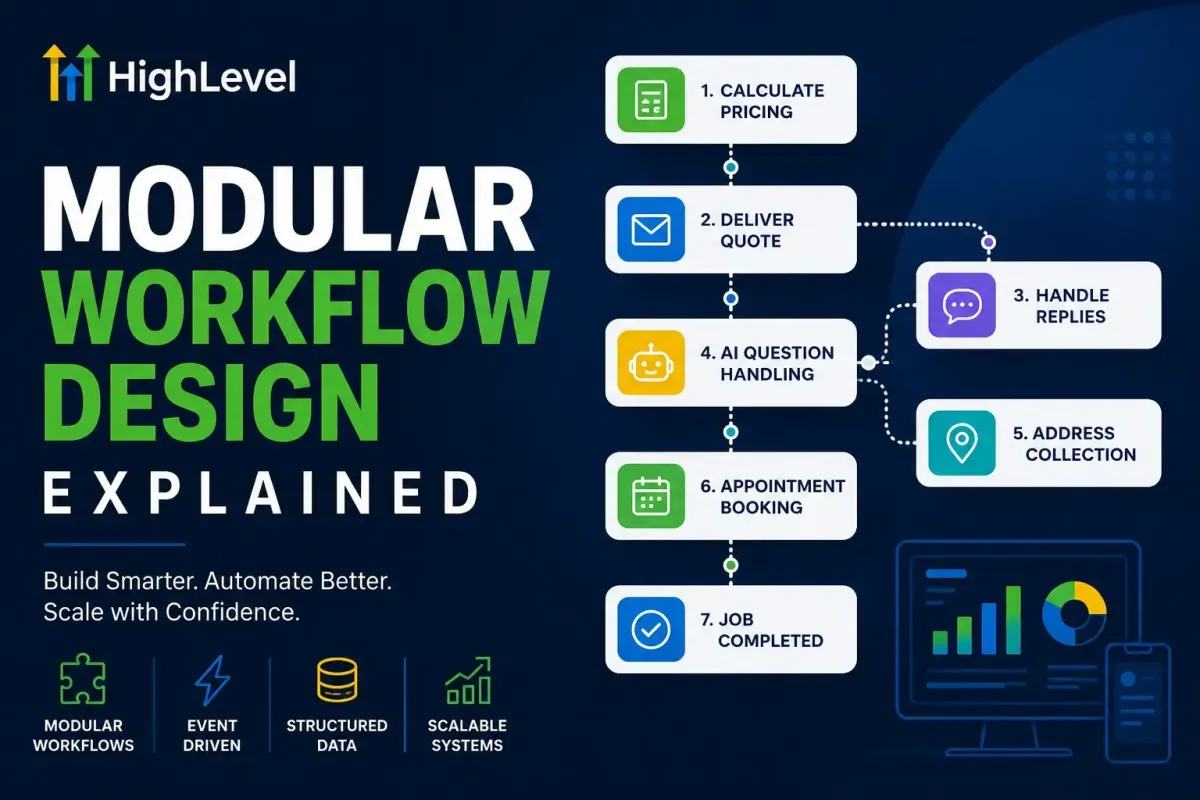
Modular Workflow Design Explained in HighLevel
HighLevel is far more than a CRM or marketing automation platform. When designed correctly, it becomes the operational backbone of a business, connecting marketing, sales, customer service and fulfilment through structured automation.
One of the biggest differences between an automation system that lasts for years and one that becomes impossible to maintain is workflow architecture. Many HighLevel accounts gradually become cluttered with enormous workflows containing hundreds of actions, duplicated logic and complex branches. While these may work initially, they quickly become difficult to update, troubleshoot and scale.
A far better approach is modular workflow design.
Rather than creating one enormous workflow that attempts to manage every possible customer journey, modular design separates business processes into smaller, specialised workflows that each perform a single responsibility exceptionally well.
This software engineering principle has existed for decades and applies perfectly to CRM architecture.
In this article, we'll explain what modular workflow design is, why it matters, and how you can implement it inside HighLevel to create cleaner, faster and more reliable automation.
What Is Modular Workflow Design?
A modular workflow is a workflow designed to complete one specific task rather than an entire customer journey.
Instead of creating a workflow that:
Calculates pricing
Sends emails
Sends SMS
Sends WhatsApp
Waits for replies
Books appointments
Creates tasks
Moves opportunities
Starts follow-ups
Stops follow-ups
Updates reporting
...you split these into multiple workflows that each have a clearly defined purpose.
Each workflow becomes a reusable component of your CRM.
Think of them as individual software modules that work together to create a complete system.

Why Large Workflows Become Difficult to Maintain
Many HighLevel users begin with a simple workflow.
Over time, they add:
another email
another condition
another wait step
another If/Else
another trigger
another campaign
Six months later, the workflow contains over 250 actions.
Nobody remembers why half of them exist.
Changing one small section risks breaking another.
Testing becomes difficult.
Finding bugs becomes frustrating.
Performance becomes unpredictable.
Eventually, the workflow reaches the point where everyone is afraid to edit it.
This isn't a HighLevel problem.
It's an architecture problem.
The Software Engineering Principle
Professional software developers rarely build one enormous application inside a single file.
Instead, they separate software into modules.
For example:
Authentication
User Management
Payments
Reporting
Notifications
Billing
Each module performs one job. HighLevel should be designed in the same way.
HighLevel Works Best as an Event-Driven System
One of HighLevel's greatest strengths is that workflows can start whenever important business events occur.
Examples include:
Form submitted
Opportunity created
Opportunity stage changed
Appointment booked
Appointment cancelled
Customer replied
Payment received
Custom field updated
Tag added (where appropriate)
AI Decision completed
Each event becomes the starting point for a specialised workflow.
Instead of pushing contacts through one massive automation, the CRM reacts naturally to events happening throughout the customer lifecycle. This creates a much cleaner architecture.

A Fictional Example: Carpet Cleaning Company
Imagine a local carpet cleaning company that offers instant quotations online.
Many people attempt to automate the entire customer journey inside one workflow.
Instead, the system could be divided into specialist workflows.
Workflow 1 – Calculate Pricing
Responsibility:
Receive customer information and calculate pricing.
Actions:
Read custom fields
Perform workflow mathematics
Store prices
Update quote fields
Set Quote Stage to Quote Calculated
The workflow ends. It does nothing else.
Workflow 2 – Deliver the Quote
Trigger: Quote Stage changes to Quote Calculated
Responsibilities:
Send email
Send WhatsApp
Send SMS if required
Update communication history
The workflow ends.
Workflow 3 – Handle Customer Replies
Trigger: Customer replies.
Responsibilities:
Detect intent
Identify chosen service
Update Selected Service
Update Quote Stage
The workflow ends.
Workflow 4 – AI Question Handling
Trigger: Customer replies with a question.
Responsibilities:
Answer questions
Retrieve Knowledge Base information
Escalate if required
Return the customer to the sales process
Nothing else.
Workflow 5 – Address Collection
Trigger: Quote Stage becomes Address Required
Responsibilities:
Request address
Validate postcode
Extract structured address using AI
Store address fields
Update Quote Stage
Workflow complete.
Workflow 6 – Appointment Booking
Trigger: Quote Stage becomes Ready to Book
Responsibilities:
Create appointment
Send confirmation
Update pipeline
Notify staff
Again, only one responsibility.
Why This Is a Better Approach
Every workflow becomes:
easier to understand
easier to test
easier to replace
easier to reuse
easier to troubleshoot
When someone asks:
"Where are appointment confirmations sent?" You instantly know which workflow contains the logic.
Workflows Become Reusable Components
One overlooked benefit of modular architecture is reusability.
Imagine you introduce:
Facebook Lead Ads
Google Lead Forms
Website forms
Chat widgets
AI Voice Agents
WhatsApp enquiries
Instead of duplicating all automation for every lead source, every source simply updates the same structured fields. Those field changes trigger the existing modular workflows. You only build the sales process once.

Separate Business Logic from Communication
Many workflows mix calculations with communication.
For example:
Calculate the quote.
Immediately send an email.
Immediately send SMS.
Immediately send WhatsApp.
Create opportunity.
Schedule reminders.
Move pipeline.
This tightly couples multiple business processes together.
Instead, separate them.
Pricing belongs in pricing workflows.
Communication belongs in communication workflows.
Appointments belong in booking workflows.
Reporting belongs in reporting workflows.
This separation makes future changes dramatically easier.
Use Custom Fields as the Single Source of Truth
Modular workflows rely on structured data.
Every workflow should read and write to the same custom fields.
For example:
Quote Amount
Service Selected
Appointment Date
Last Communication
Customer Status
Quote Stage
Booking Status
Rather than passing information between workflows manually, each workflow simply reads the latest values.
The CRM itself becomes the shared memory of the business.
Let Pipeline Stages Describe History
A useful design principle is to make pipeline stages describe something that has already happened.
Examples include:
Quote Calculated
Quote Sent
Customer Replied
Address Received
Appointment Booked
Clean Completed
These past-tense stages clearly represent completed milestones.
They also provide reliable triggers for modular workflows and produce much cleaner reporting.
Design Around Events, Not Time
Many CRM systems rely on long wait steps.
For example:
Wait 14 days. Do something. Wait another 7 days. Do something else.
Instead, ask:
"What business event should trigger the next workflow?"
Examples:
Customer replied.
Invoice paid.
Appointment confirmed.
Payment failed.
Address received.
This event-driven approach produces automation that reacts to customers instead of following fixed timelines wherever possible.

Naming Workflows Properly
Good naming conventions become essential as systems grow.
A consistent format might be:
001 – Lead Capture
002 – Pricing Engine
003 – Quote Delivery
004 – Customer Replies
005 – AI Sales Assistant
006 – Address Collection
007 – Appointment Booking
008 – Follow-up Automation
009 – Customer Onboarding
Numbers make navigation easier while keeping related workflows together.
Avoid Copying Logic
One common mistake is copying identical actions into multiple workflows.
For example:
Five workflows all contain the same email. Later the email changes. Now five workflows require updating.
Instead, trigger one communication workflow whenever the relevant business event occurs.
One place to maintain. One version of the truth.
AI Benefits from Modular Architecture
As AI becomes more deeply integrated into HighLevel, modular design becomes even more valuable.
Instead of placing AI inside one enormous workflow, create dedicated AI responsibilities such as:
Intent detection
Lead qualification
Knowledge Base answers
Data extraction
Appointment scheduling
Sentiment analysis
Each AI workflow performs a focused task and returns structured data that other workflows can use.
AI becomes another modular service within your CRM architecture rather than replacing it.
Easier Testing and Troubleshooting
Imagine a customer says they never received their quotation.
With modular workflows you immediately know where to investigate.
Did Pricing complete?
Did Quote Delivery trigger?
Was the email sent?
Was WhatsApp delivered?
Each workflow has a clear responsibility. Finding problems becomes significantly faster.
Better Performance
Large workflows often evaluate hundreds of unnecessary conditions.
Smaller workflows generally execute fewer actions, finish faster and reduce unnecessary processing.
They are also easier to optimise because each workflow has a single measurable objective.
Better Collaboration
When multiple team members work on the same HighLevel account, modular workflows reduce conflicts.
One person can improve the pricing engine.
Another can update appointment reminders.
Another can develop AI automation.
Each module can evolve independently without affecting unrelated processes.
Design for Future Change
Businesses change constantly.
New services.
New pricing.
New lead sources.
New AI capabilities.
New communication channels.
Modular workflows allow you to replace individual components without rebuilding the entire CRM.
Need to replace SMS with WhatsApp?
Replace one workflow.
Need to introduce an AI qualification?
Add a new workflow.
Need to change pricing?
Update the pricing module only.
This flexibility is one of the biggest long-term advantages of modular architecture.
Final Thoughts
The most successful HighLevel systems are rarely the ones with the most automation. They are the ones with the best architecture.
By designing workflows as independent, single-purpose modules, you create a CRM that is easier to understand, easier to maintain and far more scalable. Each workflow has one responsibility, structured custom fields act as the single source of truth, and business events trigger the next stage of automation naturally.
As your business grows, this approach allows you to introduce new lead sources, AI capabilities, communication channels and services without constantly rebuilding existing automations.
Think of HighLevel less as a collection of workflows and more as a carefully engineered operating system. When every module has a clear purpose and every automation is driven by structured data, your CRM becomes faster, more reliable and much easier to evolve over time.